Recommendations
Recommendations are suggestions for complementary items or replacement items. Customers check out their carts and shoppers facilitate item replacements every day. This customer feedback provides a rich understanding of what makes a great replacement or complementary option for an item. The Instacart recommendations service uses machine learning to analyze purchasing patterns across all orders fulfilled by Instacart and to rank items based on popularity and other factors. This data is used to improve the relevancy of recommended items.
Complementary items
Complementary items are the types of items that customers often buy together in a cart. For example, if a cart contains peanut butter, your storefront might display a list of complementary items, such as a selection of jams, jellies, marmalades, bananas, and bread. A well-curated list of complementary items can improve the customer’s shopping experience and might increase the number of items in the customer’s cart.
The Instacart recommendations service uses machine learning to rank items based on popularity, and then generates a list of popular items that are complementary to the items in the cart. Based on where in the shopping journey the list is to be displayed, other factors might be used to adjust the list.
When displaying complementary items, the following rules apply:
- Items must be available in the selected store.
- If a complementary item is currently in the customer's cart, it is omitted from the list.
- Items are displayed in order of popularity, unless other tools are used to boost items to the beginning of the list.
A customer's previous purchases can be a factor when generating complementary items, but it depends on where the complementary items show up in the user journey. For more information, see the Related topics.
Product pairings
Product pairings are curated suggestions aimed at inspiring customers by showcasing products that pair well together. This feature focuses on enhancing the discovery process, highlighting combinations that create rich buying opportunities. Unlike complementary items, which focus on items based on broader customer behavior or past purchases, product pairings emphasize discovery and inspiration by displaying thoughtfully-crafted combinations. For example, while exploring pasta, customers might see a pairing of a specific brand of spaghetti with a premium tomato sauce or gourmet parmesan cheese.
Pairings appear in the following locations during a customer’s shopping experience:
- Search results
- Browsing
- Checkout aisle
The following image shows product pairings on a search results page after ground beef was added to the cart:
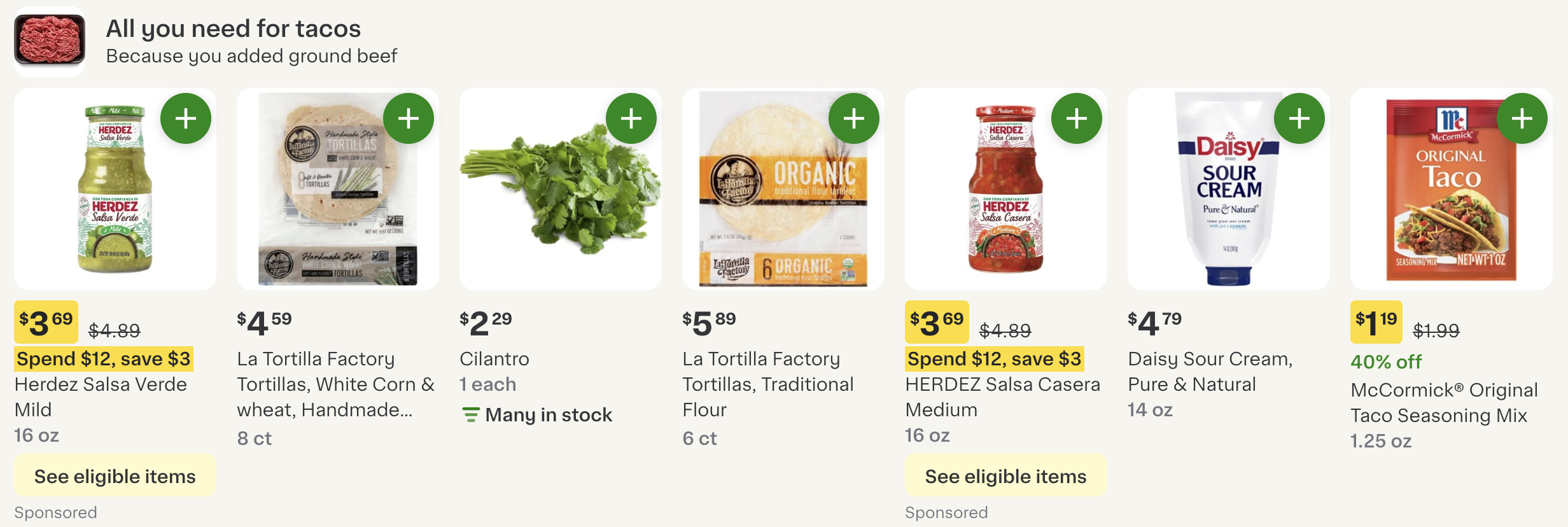
To enable this feature, contact your Instacart representative.
Scoring
The product pairings service uses a combination of co-purchase scoring and machine learning to suggest pairings. The suggestions may reflect popular pairings or pre-configured bundles to engage customers earlier in their shopping journey.
When a customer searches for an item or adds an item to their cart, that item becomes an anchor item for pairing. These pairings are ranked based on a combination of two scores:
- Machine learning. Evaluates how relevant each pairing is to the anchor item.
- Co-purchasing. Evaluates how often an item is purchased alongside the anchor item.
When the two scores are combined, the pairing with the highest combined score is shown to the customer.
Nutritious choice carousel
The nutritious choice carousel uses nutritional data to surface products with high nutritional content on your storefront's homepage, helping health-conscious customers discover better-for-you options.
Each carousel displays a nutrition facts panel on each item card, setting it apart from standard product carousels.
The following image shows a nutritious choice carousel:
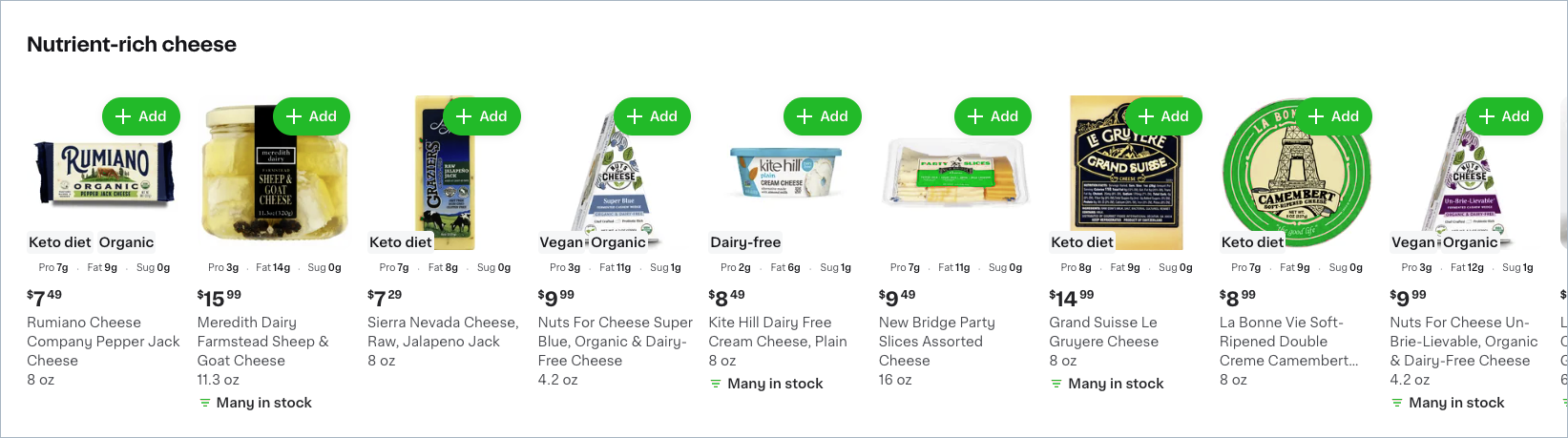
Customers see up to three nutritious choice carousels, each titled "Nutrient-rich [category]," such as Nutrient-rich cheese or Nutrient-rich pantry. Carousels vary by shopper based on purchase history and popular categories.
Sponsored products may appear within the carousel. For more information, see Ads.
Replacement items
Replacement items are the items that customers would see on the shelves surrounding a preferred item while shopping in store. You can provide a similar experience for online customers by displaying recommended replacement items. High quality recommendations for replacement items increase the chance that your customers can buy the types of items they need, even if the items aren’t their first choice of brand or size. From both the customer and retailer perspectives, a satisfactory replacement is always preferable to a refund.
For each item in a cart, the Instacart recommendation service uses machine learning to generate a list of replacement items.
The factors used to select the replacement items for a cart item can include things like:
- An item's similarity to the cart item.
- How often other customers accepted an item as a replacement for the cart item.
- The customer’s replacement history for the cart item.
When displaying replacement items, the following rules apply:
- Items must be available in the selected store.
- A customer's past replacement selections are shown at the beginning of the list.
- All other items are shown in order of popularity.
Restock reminders
This capability is available with Storefront Pro 5.
Restock reminders are personalized nudges to repurchase items from categories a customer buys regularly, shown when the customer is likely due to buy again. Unlike the other recommendation types on this page, which draw on what's currently in the cart, restock reminders draw on a customer's longer-term purchase history in a category to estimate when they're likely running low.
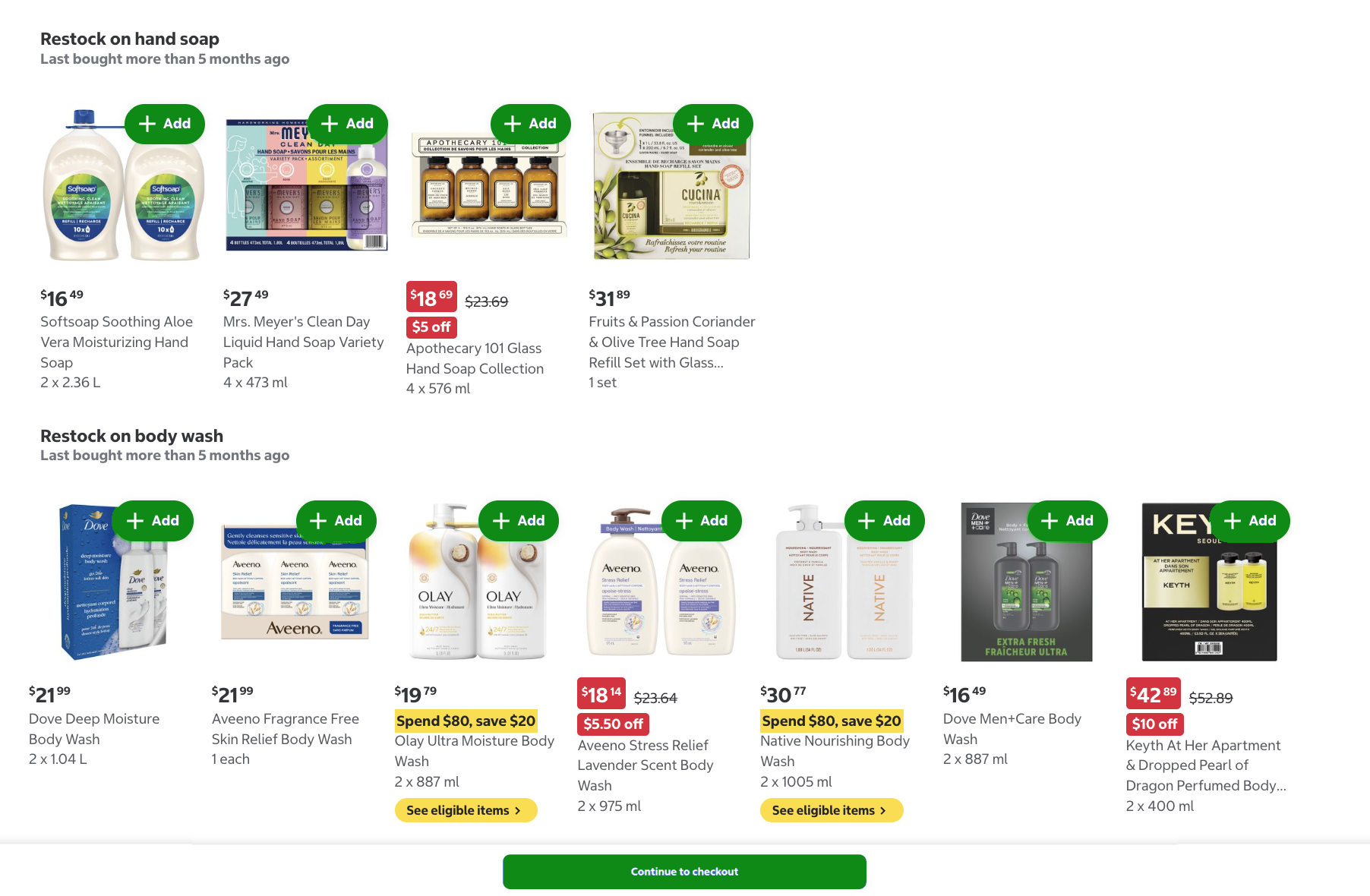
Up to three restock reminders appear in the checkout aisle during a customer's shopping experience.
The following image shows two example restock reminder carousels:
The following categories are eligible for restock reminders: personal care, laundry, paper, pet food, over-the-counter (OTC) medicine, alcohol, vitamins and supplements, and cleaning.
A customer sees a restock reminder for a category only when all of the following are true:
- The customer is in the United States or Canada.
- The customer has previously purchased an item in the category on your storefront.
- The customer is an established, repeat customer. New customers are eligible only for the pet food and alcohol categories.
- Your store carries at least one of the eligible categories above. Retailers built around a single category, such as alcohol, pet, baby, or beauty stores, are excluded.
Restock reminders are enabled by default. To turn them off, contact your Instacart representative.
Ads
Sponsored product ads can appear in some of the complementary items lists and nutritious choice carousels. Some of the sponsored products are boosted to the beginning of the list. Other sponsored products may be interspersed among the items in the list. The number and placement of the ads are subject to change without notice. For more information about the ads service and where ads appear in the storefront, see Ads.