Barcode scanner for mobile apps
In the mobile apps (iOS and Android), customers can scan product barcodes to find products in your catalog. When at home, customers can scan the barcode of a product they have on their shelves that they want to restock, and then they can add the found item to their cart or shopping list. When in a store, they can scan a product barcode and then add the found item to a shopping list. To use the scanner, customers must give the app permission to use their camera.
The following image shows the flow the customer can experience:
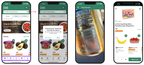
The customer flow has the following steps:
- In the search bar, click the Scan icon.
- Allow access to the device's camera.
- Position the device's camera over the product's barcode.
- If the product is in the store catalog, the product details page is displayed. The customer can add the item to their cart or shopping list as usual.
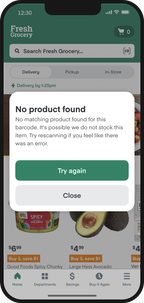
If the product isn't in the catalog or the barcode wasn't captured correctly, a message explains the issue. The message includes a button that the customer can use to scan the barcode again, as shown in the following image: