Recipes page
A recipes page displays recipes by category and recipes saved by a signed-in customer. The recipes page is a type of content page that you create by using Instacart Platform Portal.
Page content
The following image shows an example of a recipes page on desktop:
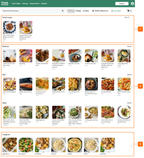
You can configure your recipes page to include the following sections:
- Saved Recipes Carousel. Displays the recipes that the customer saved.
- Recipes Carousel. Displays the recipes in a category. For example, the Breakfast recipe carousel might include recipes for breakfast wraps, cold brew iced coffees, and pancakes.
- Recipe Categories Carousel. Displays the recipe categories. For example, Appetizers, Breakfast, and Entrees.
To create and manage your recipes page, use Instacart Platform Portal. For more information, see Manage content pages.
Page entry points
Use Instacart Platform Portal to add links to the recipes page from the following locations:
- Custom header
- Primary banner carousel on the custom homepage or a content page
- Recipes carousels on the custom homepage or a content page
Example customer journey
A customer in the delivery shopping context wants to browse recipes.
-
The customer views the custom homepage and sees the following entry points to recipes:
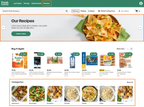
-
The customer clicks the Recipes link in the navigation.
The recipes page displays.
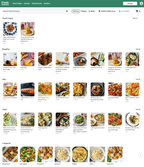
-
The customer selects the Appetizers category.
The category page displays appetizer recipes.
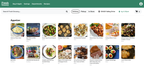
-
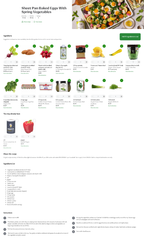
The customer selects a recipe.
The recipe details page displays the recipe, including ingredients, instructions, and nutritional information.
-
(Optional) The customer clicks Save recipe to save the recipe for future use. Saved recipes appear in the Saved recipes carousel.
-
(Optional) The customer removes or adds ingredients depending on whether they already have the ingredient or want to tweak the recipe.
-
The customer clicks Add # ingredients to cart. The items appear in their cart.