Order status banner
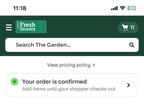
The order status banner enables customers to view the status of their active orders on your custom homepage. The banner displays real-time order status updates and shows whether customers can add items to their order. If there are multiple active orders, the order statuses appear stacked vertically. Customers can reschedule the order or use the Add to order experience to add items to their active order.
To add the order status banner to your custom homepage, use Instacart Platform Portal. For more information, see Manage your custom homepage.
Order status banner on the custom homepage
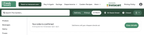
The following image shows an example of an order status on desktop:
The following image shows an example of an order status on mobile browser:
Dynamic status updates
The order status banner automatically updates as the order progresses through fulfillment. These updates help customers understand when they can add items to their order.
The following table lists the status updates displayed in the order status banner:
| Order Status | Banner Message |
|---|---|
| Your order is confirmed | Add items until your shopper checks out |
| Heading to the store | Add items until your shopper checks out |
| X items left to be shopped | Add items until your shopper checks out |
| Heading to you soon | You can no longer add or edit items |
| Heading to you | You can no longer add or edit items |
Add to order experience
When an order is active, the behavior of the Add button changes. The button adds items to the active order instead of to the cart.
To exit the add to order experience, customers can open their cart and create a new cart. Then, the Add button adds items to their cart.