Loyalty program page
A loyalty program page describes your customer loyalty program and includes a way to sign up for a loyalty account with a phone number.
The following image shows a loyalty program page on a mobile app:
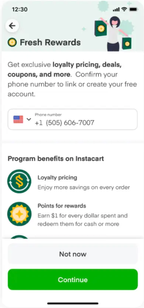
Loyalty program page content
When designing your loyalty program page, use the following template to understand the required assets and where they appear on the page.
The following image shows the loyalty program page template with labeled annotations:
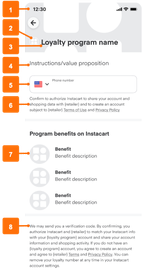
- Background image
- Mobile: 1425x402 pixels
- Desktop: 1000x310 pixels
- Icon
- Mobile: 84x84 pixels
- Desktop: 110x110 pixels
- Name of the loyalty program
- Primary text
- Field for phone number
- Secondary text with up to two hyperlinks
- Benefits, each with:
- Icon: 192x192 pixels
- Name: Approximately 36 characters
- Description: Approximately 64 characters
- Legal disclosure with up to two hyperlinks
Navigation to the loyalty program page
By default, a link to the loyalty program page appears in the header.
Loyalty banner
Advertise your loyalty program by adding a banner that links to your loyalty program page. Banners are displayed to all customers, regardless of loyalty status.
The following image shows an example of a loyalty banner on the homepage:
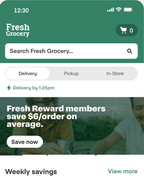
To create a loyalty banner, use Instacart Platform Portal. For more information, see Create creatives.