Loyalty points
Loyalty points are supported with a selection of loyalty program providers. To check if points are supported with your provider, contact your Instacart representative.
Loyalty points are rewards from a loyalty program. Depending on the loyalty program provider that's integrated, your customers may be able to earn and redeem points from your storefront. You can also display points balance and redemption history.
Points earning
Customers can earn points by shopping on your storefront. The points earned are dependent on the loyalty program provider that's integrated.
Points redemption through storefront offers
You can set up basket discount offers that allow customers to redeem points for discounts on their basket. For example, customers can use 1,000 points to get $10 off their basket.
For information about Dollar off basket discount offers, see Basket discount offers.
Redeemed points are applied automatically during the checkout process. Discounts from points are reflected on the order status and receipts pages.
The following images show how loyalty points are displayed on a loyalty or rewards page:
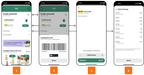
- Points balance on the Rewards page.
- Access loyalty barcode.
- Redeem points to save on future orders.
- View reward history.
Rewards history
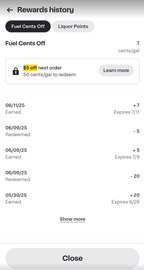
Loyalty points are displayed in the Reward history page with the following details:
- Date of transaction
- Points earned and redeemed
- Category of the purchase (such as groceries), if available
- Expiration date, if available
The following image shows an example of a Rewards history page:
If your customers can't view the Rewards history page, contact your Instacart representative.