In-store transactions on your storefront
If you integrated your in-store transactions with your storefront, customers can view their in-store purchase history alongside their online orders.
The following images show an example of checking an in-store receipt from the Orders page:
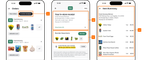
- In-store receipts tab. A tab or button appears on a customer's order page that displays in-store order receipts.
- In-store receipt. A clickable tile that displays the in-store receipt.
- Reorder button. A button that allows the customer to reorder items from their in-store order.
- Item summary. A summary of the complete in-store order.