Packs and configurable items
If you integrated Storefront Pro with FoodStorm, you can define packs to sell on your storefront. Packs are catering and meal bundles configured by retailers in FoodStorm order management system (OMS). On your storefront, packs are displayed in tiles and product details pages, but they behave differently than standard item tiles and product details pages.
To configure packs, use the FoodStorm order management system (OMS). For more information, contact your FoodStorm Customer Success Manager.
Item tiles
Item tiles for packs look similar to standard item tiles, but customers can't add packs directly to the cart from the tile. Instead, clicking the item opens the product details page, where customers make their selections before adding the item to their cart.
Product details page
The product details page for packs looks similar to standard product details pages, but they have additional sections for configuring the pack.
The following image shows a product details page for a pack with customizable meal options:
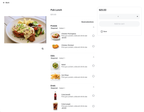
The following components appear on product details pages for packs and configurable items:
- Configuration sections. Each section groups a category of choices, such as Entrée or Sides. Sections can be required or optional.
- Option rows. Each option within a section displays the option name, an optional description, an optional item image, and any applicable surcharge. Depending on the item, options may also display as color swatches or image tiles.
- Fixed items. Items that are always included in the pack appear as non-selectable rows, so customers can see what's included without being prompted to choose.
- Running price. The displayed price updates as customers make selections that carry surcharges.
- Add to Cart. For packs, this button is only enabled after all required sections have a selection. If required selections are incomplete, the button is inactive and customers are prompted to complete their choices.
Packs and item availability
If an item in a pack option is unavailable, that option can't be selected. If all options in a required section are unavailable, the entire pack is hidden on the storefront.
Pack-only items can't be individually marked as unavailable. If a pack option is not also published as a standalone item, Instacart automatically treats it as available.