Digital flyers
With a digital flyer, customers can view promotional items as product tiles organized by category. A Great buys section highlights your best deals and supports multiple concurrent flyers with different schedules. You can add an optional PDF for customers to view. Shows dynamic pricing from your catalog. A banner image is required.
To create and manage digital flyers, use Instacart Platform Portal. For more information, see Manage digital flyers.
Digital flyer page content
The following image shows an example of a digital flyer:
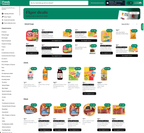
Digital flyers can be updated after publication.
Personalization
On digital flyer pages, a Buy it again carousel can show a customer the items they've previously purchased at your store that are also part of the current flyer. This brings personalization into the flyer, so customers can spot deals on the products they already buy without searching for them.
Buy it again carousels are available on digital flyers only and aren't available on clickable or browsable flyers.
The carousel appears only when a signed-in customer has at least two items that are in both their Buy it again collection for your store and the current flyer. If fewer than two items match, the carousel doesn't appear and the rest of the flyer is unchanged. Customers who aren't signed in don't see the carousel.
Only items in the current flyer are eligible. Items from other flyers don't appear. The latest purchase history data for a customer is refreshed every four days, so items a customer purchased in the last few days might not appear in the carousel right away.
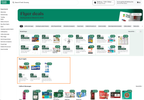
On the flyer page, the Buy it again carousel appears below the Great buys section and above the category sections. The carousel supports localization, so it appears in the language of the storefront the customer is browsing.
The following image shows an example of the Buy it again carousel on a digital flyer page:
To add a Buy it again carousel to a digital flyer, use Instacart Platform Portal. For more information, see Manage digital flyers.