Browsable flyers
With a browsable flyer, customers can view a flyer preview with a PDF thumbnail alongside flyer item tiles. The PDF is expandable but isn't clickable.
The following image shows an example of a browsable flyer:
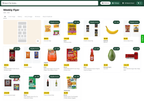
To configure the contents of a browsable flyer, define the flyer data in flyer files and upload the files to Instacart. The process is similar to updating your catalog inventory files. For more information, see Flyers data ingestion.
To configure a flyers page, work with your Instacart representative.
Browsable flyers can't be changed after publication.