Creative placements
To place a creative on a page, you add it to a slot, which is a section on a page that's reserved for displaying creatives. Static slots display the same creative to all customers. For example, you want to display a creative to highlight weekly deals. Dynamic slots display different campaigns and their associated creatives based on segmentation and scheduling rules. For example, you create one campaign with a banner creative to target the New York region and another campaign with a different banner creative to target the San Francisco region. Customers see the campaign that's targeted to their region.
The following image shows a homepage with various types of creatives:
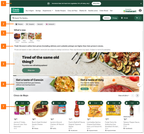
- Announcement banner
- Quick link carousel
- Image tile carousel
- Text container
- Primary banner carousel
- Secondary banner carousel
- Product carousel
To review the list of available creatives, see Creatives library.
To create creatives and add them to pages or campaigns, use Instacart Platform Portal. For more information, see: