Checkout page
After the customer clicks the Continue to checkout button from the checkout aisle recommendations, the checkout page opens. The customer is prompted for all the information necessary to fulfill the order. The customer can review the order items and totals and then click a button to place their order.
Checkout page capabilities
Depending on the onboarding decisions you made, the checkout page may include different capabilities or behave differently.
The following table summarizes the capabilities and the dependencies:
| Capability | Dependency | Description |
|---|---|---|
| Delivery and Pickup tabs | Fulfillment options | If you offer customers only one type of option, that option is displayed and the other tab is hidden. |
| Time slots | Service options | The available time slots are controlled by the selected service options. Service options include estimated time of arrival (ETA) for same day delivery or scheduled for either later the same day or a future day. |
| Payment methods | Payment options | If you offer multiple payment methods, the customer can select the payment method they want to use. |
| Gifting | Gifting | Customers can send a delivery order as a gift to friends and family. |
| Instacart+ membership | Instacart+ membership | For customers who are eligible for an Instacart+ trial, the membership subscription toggle is enabled by default during checkout. If a customer turns the toggle off, it remains off for future sessions. |
| Data sharing | Opt-in for customer data sharing | Instacart requires a customer's permission to share their details. Add this section if you want to receive customer data. For retailers with an opt-in for marketing data sharing, the prompt appears after checkout has completed. |
With Storefront Pro, customers can also view and manage promotional offers during checkout. For more information, see Checkout offers and promo codes.
Delivery order details
The following image shows an example of a checkout page for a delivery order:
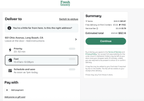
For a delivery order, a customer selects the Delivery tab and then provides the following details:
- Delivery address. The address where the customer wants to receive the order. If the customer's current location is more than 1 mile from where they want their order delivered, a notification prompts them to confirm the delivery address. If the customer changes the delivery address at checkout, the change is saved and applies to the storefront.
- Delivery instructions. The customer's instructions to the shopper, such as Go to the side door or Leave order at the door. Customers can also add their phone number here.
- Membership subscription. A toggle to allow the customer to subscribe to a membership program if one is available.
- Shipping. There are three available shipping options, Priority, Fast, and Schedule and save. Each option offers different price points relative to how soon an order can be delivered.
- Payment method. The method of payment. A credit card or debit card is required, but other options might be available.
Pickup order details
The following image shows an example of a checkout page for a pickup order:
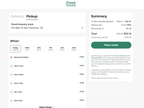
For a pickup order, a customer selects the Pickup tab and then provides the following details:
- Store. The location where the customer wants to pick up the order. If the customer changes the store at checkout, the change is saved and applies to the storefront.
- Pickup time. The window of time when the customer wants to receive their order.
- Membership subscription. A toggle to allow the customer to subscribe to a membership program if one is available.
- Payment method. The method of payment. A credit card or debit card is required, but other options might be available.