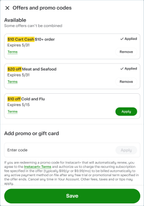
Offers and promo codes
With Storefront Pro, customers can view and manage promotional offers during checkout.
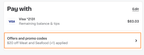
The customer clicks Offers and promo codes to view details about the offers currently applied to the order and add or remove any applicable offers and promo codes.
The following details apply to offers and promo codes:
- Some offers are automatically applied and can't be removed by the customer.
- Conditional offers show a progress tracker that displays the progress toward the qualifying amount. When the condition is met, the progress tracker is removed and the offer can be applied.
- Stackable offers can be combined and applied together. Non-stackable offers can't be combined. If the customer applies a non-stackable offer, other non-stackable offers are automatically removed.