Click-to-redeem offers
Instacart Storefront Pro supports click-to-redeem offers where customers can click a link or scan a QR code to redeem the offer. Direct link campaigns are available for minimum spend campaigns. Use click-to-redeem offers to drive customers to shop at your storefront. For example, you might offer $10 off their first online order over $35.
To create a direct link campaign, use Instacart Platform Portal. For more information, see:
- Create a minimum spend offer on baskets
-
Create a minimum spend offer on products, collections, and departments
To track the performance of your click-to-redeem campaigns, see Campaigns with offers dashboard.
Sharing click-to-redeem offers
Here are some examples of where you can use click-to-redeem offers:
-
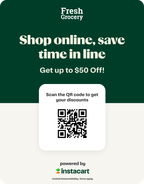
In-store marketing. Distribute printed marketing materials to your customers, or position printed materials throughout the store in high-traffic areas for visibility. For example, at checkout, your cashier places a marketing poster with a special offer into your customers’ shopping bag. Customers can scan the QR code on the poster to claim the offer.
The following example shows an in-store marketing poster:
- Advertisements. Create advertisements, such as billboards or social media posts, with a direct link to where customers can redeem the offer.
- Online marketing. Send an email blast with a direct link for customers to redeem the offer.
Example journey
The following example shows a journey for a customer who claims a click-to-redeem offer on your storefront. If you also have a storefront on Instacart Marketplace, the customer can choose to redeem the offer there; the flow is similar.
-
The customer scans the QR code or clicks a direct link in an email campaign.
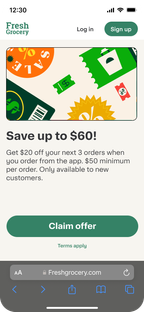
The customer is directed to a landing page on your storefront.
-
The customer clicks Claim offer.
-
The customer signs up or logs into their account.
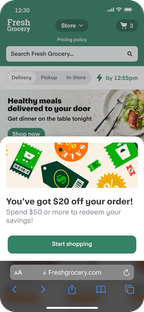
Instacart checks whether the customer is eligible for the reward. If eligible, the storefront confirms that the offer was claimed.
-
The customer clicks Start shopping.
-
The customer adds items to their cart and views their cart.
-
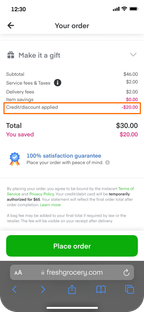
The reward is applied at checkout.