Bundle offers
If you set up an Inmar integration, you can receive bundle offers through it. Inmar is the only third-party provider that supports bundle offers.
A bundle offer is a promotion that rewards customers for buying items from two or more product groups together. For example, "Buy any chips and any soda, save $2.00." This topic explains how bundle offers work, what your customers see, and how they fit with the other offers on your storefront.
Why bundle offers
Most item-level offers reward a customer for buying more of the same thing, or for buying one product to get a discount on another. A bundle offer covers a different shopping habit: building a basket from complementary products. It gives you a way to promote pairings, such as pasta and sauce or chips and soda, and to give customers a clear reason to add the second item.
For customers, the appeal is that the savings are explicit. Instead of working out whether two separate items add up to a good deal, they see one offer that names the items and the amount saved.
How a bundle offer works
A bundle offer is built from condition groups and a reward.
Condition groups. Each group is a set of qualifying items, which can be quantity, weighted items, or a combination. A group can be a specific item, an item collection, a brand, or a department. A bundle offer can have up to five groups. The customer must have the required number of qualifying items from every group in their cart. Within a group, any qualifying item counts. For example, in "Buy any Lays chips and any Pepsi, save $2.00," a customer who adds any Lays product and any Pepsi product earns the offer.
The "and" between groups means each group has to be satisfied on its own. Items from one group don't count toward another.
Reward. The reward can be a dollar amount off or a percentage off. A free item is a 100% off reward, and customers see it labeled so it's clear the item is free. The discount is applied automatically when the cart meets every condition.
How the offer responds to changes. Bundle offers are evaluated against the customer's cart, so they respond to what the customer does:
- If a customer removes a qualifying item and the cart no longer has an item from every group, the discount is removed.
- If a shopper can't find a qualifying item at fulfillment, or substitutes it, the bundle discount doesn't apply.
- If a customer's cart has more than one qualifying item in a group, the discount is split proportionately across those items.
Customer experience
Customers see a bundle offer in the places they already look for deals:
- Item tiles. Each qualifying item shows the bundle offer label, unless a higher-priority offer takes precedence.
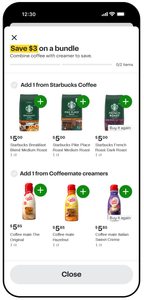
- Offer details. Customers can open the offer to see its details, their progress toward earning it, and the items in each group. The view makes the "and" relationship clear, so customers understand they need an item from each group. They can add qualifying items to their cart from here.
- Cart. When the cart meets every condition, the cart shows the savings and lists the completed offer. If the offer is tied to a loyalty card, customers see a "with loyalty card" badge where applicable.
The following image shows the offer details for a bundle offer on a mobile device.
How bundle offers work with other offers
Bundle offers are item-level offers, so they follow the same stacking rules as your other item-level offers. When an item has more than one active offer, Instacart evaluates a bundle offer in a fixed order with the other offer types. For example, a dollar off bundle is evaluated after a dollar off item, and a percentage off bundle is evaluated after a percentage off item.