Brand and style
You can customize the branding and styling for your storefront to reflect your brand and provide a consistent user experience. The brand assets and styles are used throughout your storefront.
The following image shows an example storefront with brand assets and styles:
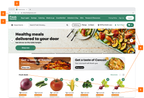
- Header
- Logo
- Favicon
- Brand colors
- Font
You can configure the following brand assets and styles:
- Logo. Your retailer banner logo. Used in the header.
- Favicon. A small brand icon. Used on the browser tab of your storefront.
- Brand colors. Your retailer brand colors. Used for primary actions, promotional elements, and loyalty elements.
- Primary. Used for primary actions, such as the Add to Cart button, links, and selections for checkbox and radio groups.
- Promotions. Used for promotions, sales, discounts, deals, free items, and offers.
- Loyalty. Used for loyalty offerings, such as loyalty clubs, discount cards, or special member pricing.
- Font. Your retailer brand font. Used in headings, navigation items, and body text across your storefront.
To configure branding and style elements, use Instacart Platform Portal. For more information, including specifications for each element, see the following topics: