Order history
The order history is a list of all the customer's previous orders that were placed on the storefront, including any orders that were canceled. A customer can select an order to view the order's details, add items from a previous order to the cart, and report an issue.
Order history page
The following image shows an Order history page:
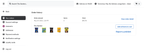
From this page, customers can perform the following actions:
- View the order details.
- Add all items from a previous order to the cart.
- Report an issue.
Order details
When a customer selects an order to view, a page opens to display the order's details. The customer can view the ordered items, including the items found, adjusted, refunded, or replaced. The order total section shows how much was authorized or charged to payment methods.
The following image shows an example of order details:
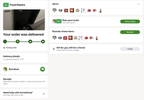
From an order's details page, customers can do the following tasks:
- Rate an order.
- Change the tip amount.
- View the receipt.
- Invite other people to shop and unlock more offers.
- Add items from a previous order to the cart.
- Report an issue.