2026_08_0 Release Notes
Release date: August 25, 2026
The release notes describe changes to Storefront for this release, including new features and enhancements. In addition to these changes, Instacart continually updates the platform to improve accessibility, performance, and stability and to ensure the best user experience for your customers.
Are you using the partner-pick model? Review the Shopper App release notes for recent updates.
New features
The following new features are available in this release.
Preference Picker
With Preference Picker, customers can set a preference for certain items when they add them to their cart. After the order is picked, the customer receives a message confirming whether their preference was met.
The following image shows the Preference Picker for bananas:
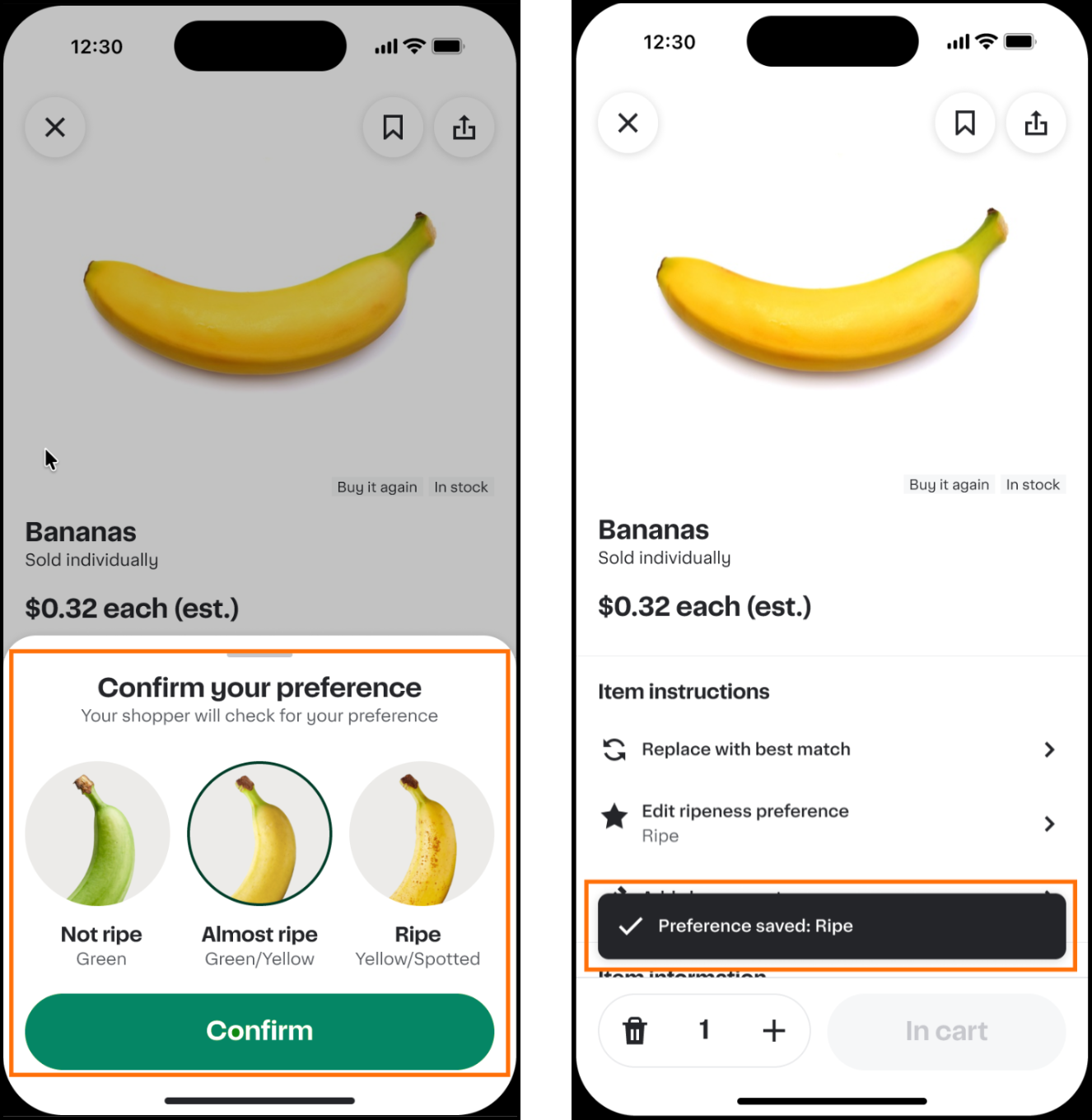
Preference Picker is available for the following items:
- Bananas and avocados. Customers choose a ripeness level: Not ripe, Almost ripe, or Ripe.
- Deli meats. Customers choose a slice thickness: Very thin, Thin, or Medium.
- Seasonal produce. Customers choose a ripeness level for peaches, nectarines, mangoes, apricots, plums, tomatoes, and pears.
To enable this feature, contact your Instacart representative.
For more information, see Preference Picker.
Nutritious choice carousel
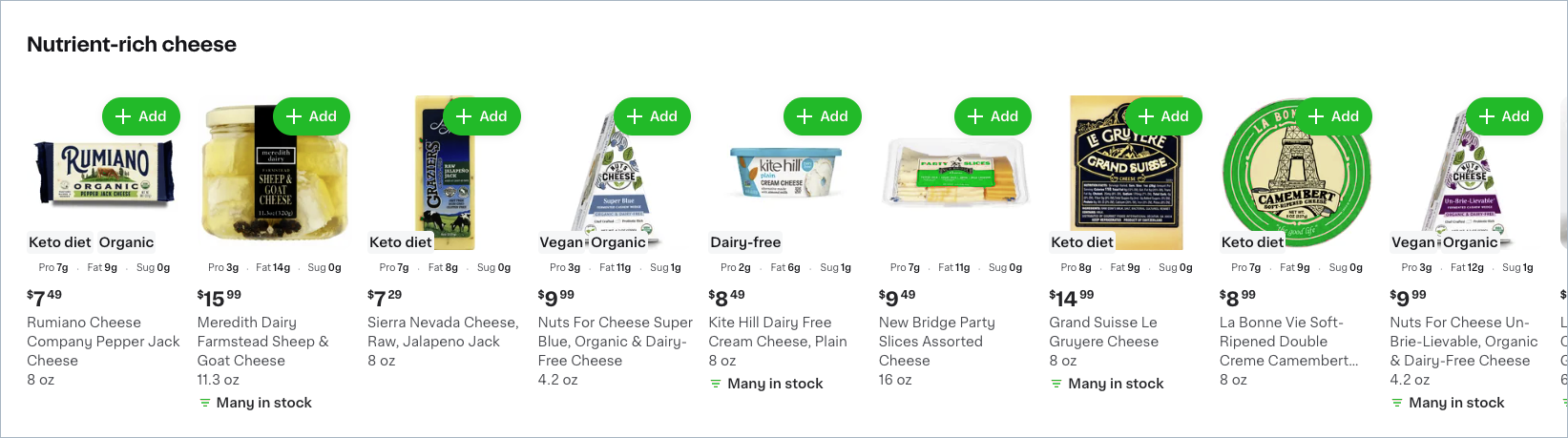
Your storefront now includes nutritious choice carousels that help health-conscious customers discover better-for-you products. The carousel highlights products with high nutritional content and varies by customer based on purchase history and popular categories.
Customers see up to three nutritious choice carousels, each titled "Nutrient-rich [category]," such as Nutrient-rich cheese or Nutrient-rich pantry.
The following image shows an example of a nutritious choice carousel:
To disable nutritious choice carousels for your storefront, contact your Instacart representative.
For more information, see Recommendations.
Customize L1, L2, and L3 department page layouts (Storefront Pro)
You can now configure layouts for L1, L2, and L3 department pages directly in Instacart Platform Portal. Previously, department pages displayed only auto-generated content. Now you can add banners and other creatives in static slots on these pages to promote seasonal campaigns, highlight collections, or align with your brand at key points in the browse experience.
You can set a global layout that applies across all L1, L2, and L3 department pages by default, or customize individual pages to override the global layout for that page only. The global layout supports scheduling, so you can plan content in advance without manual activation.
Layout customization applies to collection pages that are part of your department structure (L3 departments). Other collection pages are not yet available to customize.
Retailers with iOS and Android mobile apps receive this capability automatically through a webview implementation. No app updates are required.
For more information, see Manage department page layouts.
Multiple replacement options
Customers can now select up to three backup replacement items when setting replacement preferences for an item in their cart. Previously, customers could choose only one specific item or the best match option.
When an item in a customer's order is unavailable, shoppers can see all of the customer's saved backup options and choose one. More backup options give shoppers a better chance of finding an approved substitute, which can reduce refunds and unwanted replacements.
For more information, see Replacements.
Coupons savings and transaction history (Storefront Pro 5)
Customers can now see coupons savings on the digital coupons page, showing an approximate total of available and redeemed savings from active coupons. The available savings total only reflects coupons with a fixed dollar-off value; percentage-off and free-item offers aren't included.
Coupons transaction history shows the value of coupons redeemed for the last 12 months.
The following image shows an example of the coupon savings creative:

To add the savings dashboard and history view to your coupons page, add the coupons savings creative in Instacart Platform Portal. For more information, see View coupon transaction history.
Restock reminders on checkout aisle (Storefront Pro 5)
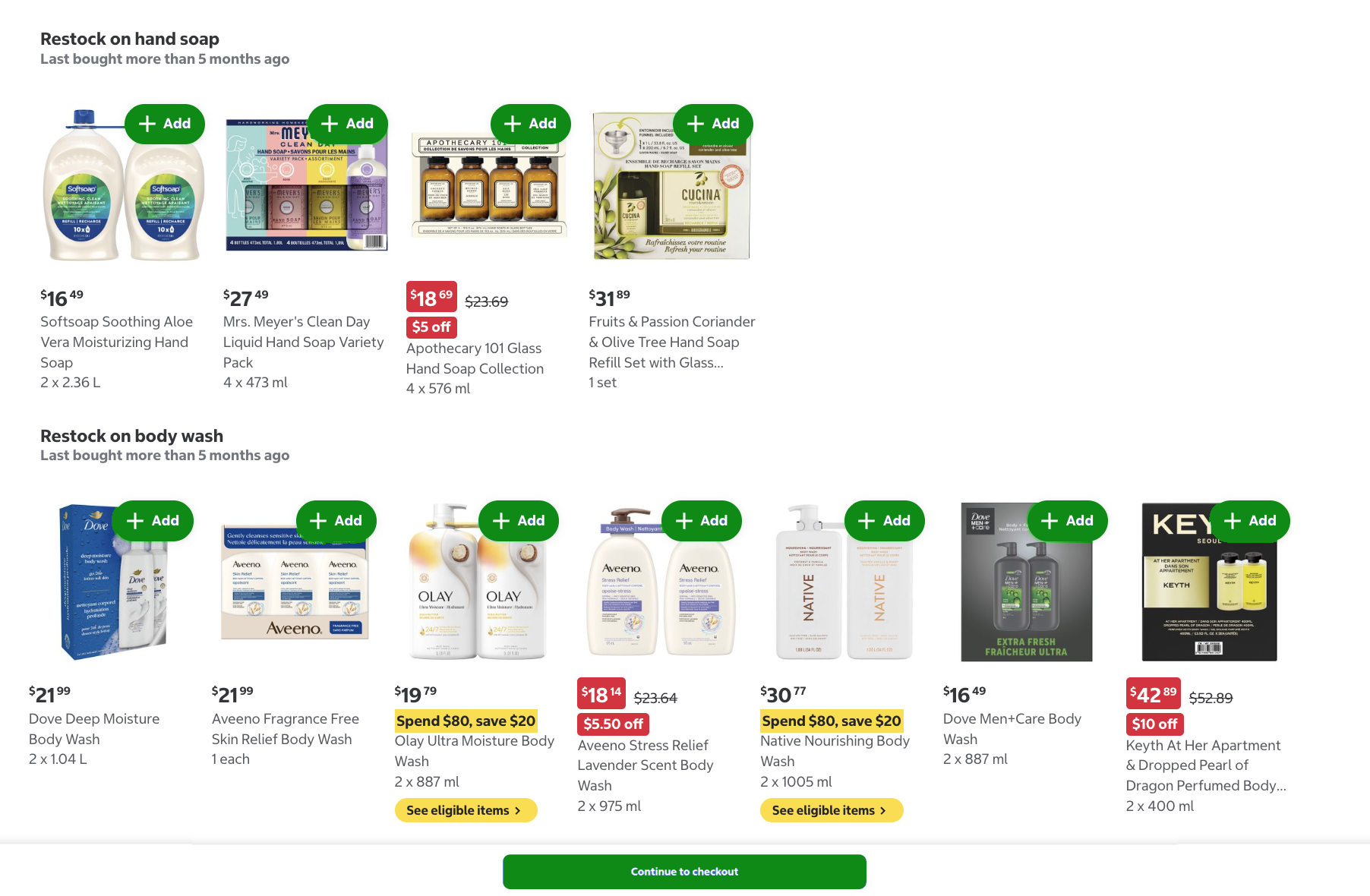
The Storefront Pro checkout aisle can now show customers a restock reminder: a personalized nudge to repurchase an item from a category they buy regularly, timed to when they're likely due to buy again. Reminders apply to personal care, laundry, paper, pet food, over-the-counter (OTC) medicine, alcohol, vitamins and supplements, and cleaning.
Restock reminders are on by default for eligible Storefront Pro retailers in the United States and Canada. Retailers that carry at least one of the eligible categories qualify. Retailers that primarily sell alcohol, pet supplies, baby supplies, or beauty products aren't eligible.
The following image shows an example of two restock reminder carousels on the checkout aisle:
To turn off restock reminders on your checkout aisle, contact your Instacart representative.
For more information, see Recommendations.
Order collaboration for family accounts
After checkout, the customer who placed an order can now let other family account members add, remove, or modify items, set replacement preferences, handle replacement decisions, and chat with the shopper. The avatar and name of the household member who took each action appear alongside the relevant items and decisions. The customer who placed the order controls collaboration and can turn it off at any time. Family members can view the order status and receipt but cannot see payment method details.
For more information, see Family accounts.
Creatives design controls for content page and homepage customization (Storefront Pro 5)
You can now customize the layout and style of creatives on your content pages and custom homepage directly in Instacart Platform Portal. The Design tab is available for creatives in static slots on content pages and the custom homepage, and is not yet available for dynamic slots.
The Design tab works at two levels:
- Page-level spacing. When you select a static slot, a Design tab appears in the configuration pane. Use it to set the space above and below the creative on that page.
- Creative layout and style. When you click Edit on a creative within a static slot, a Design tab appears in the creative editor. Use it to control the visual composition of the creative:
- For banner placements, choose whether the image and text appear side by side or the text is layered on top of the image.
- For side-by-side banner layouts, choose whether the image is on the left or right, and set the proportion of image to text. Changing the proportion requires uploading a new image at the correct dimensions. For a full list of dimensions by ratio, see Recommended media dimensions.
- For banners and card carousels, align text to the left, center, or right.
Creative layout and style changes apply to the creative globally. If the creative appears on more than one page, your changes affect how it looks everywhere.
Previously, primary and secondary banner layouts were fixed: text and the call-to-action button always appeared on the left side with the image on the right.
The new controls provide more flexibility and control to build on-brand, visually differentiated creative assets without relying on pre-composed images or custom development work.
For more information, see Manage content pages and Manage your custom homepage.
Divider line element (Storefront Pro 5)
A new divider line element is available for static slots on content pages and the custom homepage. Use a divider line to create visual separation between sections of your page. You can customize the line color, line style (solid, dashed, or dotted), and the spacing above and below the divider in the Design tab in Instacart Platform Portal.
For more information, see Manage content pages and Manage your custom homepage.
Enhancements
The following enhancements are available in this release.
Replacement default shown before checkout
For items where a customer hasn't saved a replacement preference, the default is to replace the item with the best match. Your storefront now makes this default visible before checkout by preselecting Replace with best match on the replacements screen. A Replace with best match label also appears in the cart for those items, so customers can see what happens to unavailable items before they place their order.
This is a display change only. How unavailable items are replaced is unchanged. Customers can still change the selection at any time before checkout, and items with a saved replacement preference aren't affected.
For more information, see Replacements.
On Sale filter includes coupons and promotions
The On Sale search filter now includes items with available coupons and retailer promotions, in addition to items already marked on sale in your catalog. When customers apply the On Sale filter, they see a more complete view of deal-eligible items available at your store.
For more information, see Sort and filter.
Spend limit approval requests
Instacart Business administrators can now configure spend limits to allow members to submit orders for approval when an order exceeds the limit. Members can submit over-limit orders for approval instead of being blocked. Approvers see the reason for approval before they accept or decline it.
For more information, see Spend limits.
Storefront Pro homepage mobile app webview (Storefront Pro 5)
Storefront Pro homepages on iOS and Android mobile apps now use the same webview technology as content pages. This change lays the groundwork for delivering future Storefront Pro features and improvements to mobile apps more quickly. Previously, Storefront Pro homepages used a separate native implementation on iOS and Android. These changes to the homepage are not visible to your customers.
Featured Collections in Instacart Platform Portal (Storefront Pro 5)
The Collections tool in Instacart Platform Portal now displays featured collection templates directly in the Collections workspace, so you can discover relevant templates expertly curated by Instacart without browsing the full template library. Instacart's team selects collection templates based on your catalog assortment and region, and filters out collection templates that have already been used or that don't apply to your catalog.
The featured templates appear automatically in the Portal when Instacart has an active featured collection set configured.
For more information, see Manage collections.
Updated Delivery orders and Pickup orders pages in Instacart Platform Portal
The Delivery orders and Pickup orders pages in Instacart Platform Portal have been updated with a redesigned interface, mobile support, and faster order search.
- Redesigned interface. The pages have a new layout with updated order state summary counts and filters. You can filter by location, store group, order source, and order status, and use the inline date range picker to narrow results by date.
- Mobile view. The pages now display a card layout on mobile devices. Each card represents one order and shows all the information from the list view. The layout switches automatically between a table list view and a card list view based on your device's screen size.
- Faster search. Order search on these pages is now faster.
Previously, the Delivery orders and Pickup orders pages were only accessible as a table layout, which required horizontal scrolling on mobile devices, and search results could take several seconds to load.
For more information, see Manage orders.
Updated Stripe account setup
The Stripe account setup process in Instacart Platform Portal has been updated. When you connect a new Stripe account, you're directed to Stripe's onboarding form to enter your business and banking details. The form guides you through the required information, and if you need to pause before finishing, your progress is saved. No action is required for accounts that are already connected to Stripe.
For more information, see Connect to Stripe.
Channel filter for campaign analytics
The Campaigns with offers dashboard and the Campaigns with offers custom reports dataset in Instacart Platform Portal now include a Channel filter. Use this filter to view performance metrics for campaigns delivered through a specific channel. Options are Email and Push.
For more information, see Campaigns with offers dashboard and Datasets and templates.
Digital flyer localization (Storefront Pro 5)
Digital flyers now support localization for retailers that serve customers in more than one language. Flyer content appears in the language of the storefront the customer is browsing, including banners, category names, and the PDF version of the flyer.
To enable digital flyer localization, contact your Instacart representative.
For more information, see Flyers.
Live preview on content pages and custom homepages (Storefront Pro 5)
The editing experience for content pages and custom homepages now opens in a full-page view in Instacart Platform Portal. When configuring static slots on your content pages and custom homepage, your changes now appear immediately as you work. You no longer need to save and publish to see how your changes will look. The preview uses your storefront's actual colors and fonts.
Previously, Instacart Platform Portal showed a static layout that did not reflect your storefront's branding.
For more information, see Manage content pages and Manage your custom homepage.