2026_07_0 Release Notes
Release date: July 28, 2026
The release notes describe changes to Storefront for this release, including new features and enhancements. In addition to these changes, Instacart continually updates the platform to improve accessibility, performance, and stability and to ensure the best user experience for your customers.
Are you using the partner-pick model? Review the Shopper App release notes for recent updates.
New features
The following new features are available in this release.
Inspiration ads (Storefront Pro 5)
Storefront Pro sites can now serve inspiration ads from national CPG brand advertisers. These ads help customers discover new products and shopping occasions while browsing your storefront, appearing on search results pages, storefronts, and post-checkout pages.
Inspiration ads integrate with the same ads program as sponsored products, display banner ads, and shoppable ads. They are designed to be highly relevant and fit seamlessly into your existing storefront content.
Instacart currently supports two inspiration ad formats:
-
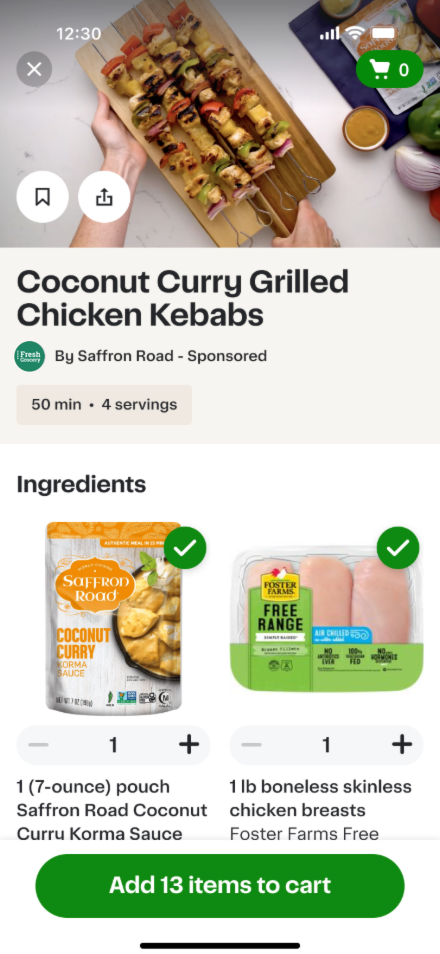
Recipe ads. Feature a recipe with shoppable sponsored ingredients. When customers search for related items, a sponsored recipe can appear in search results. Customers can click the ad to view the full recipe and add ingredients to their cart.
The following image shows an example of a recipe ad:
-
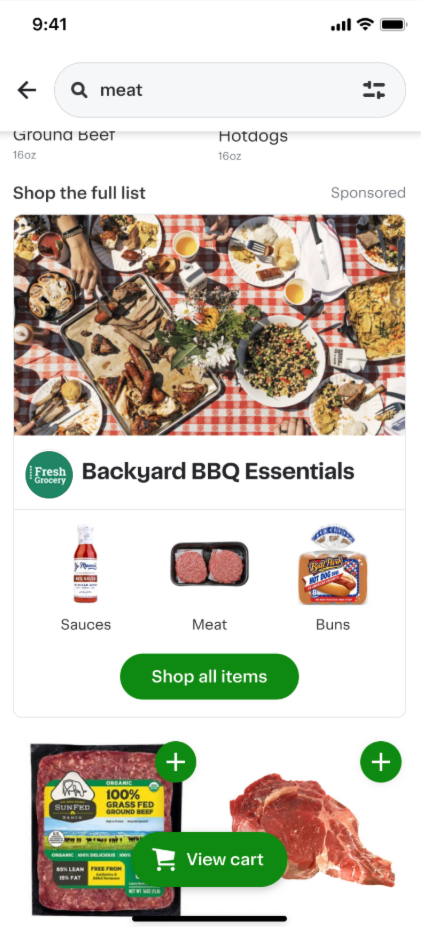
Occasion ads. Feature a curated product collection built around a shopping occasion, such as a seasonal moment or meal theme. Customers can browse products organized by category and add items to their cart from the occasion page.
The following image shows an example of an occasion ad:
Ads are not enabled by default for Storefront Pro sites. Work with your Instacart representative to enable ads on your storefront.
In Instacart Platform Portal, you can review inspiration ads using the Ads Display Review Tool.
For more information, see Ads.
Improvements to order guides for business accounts
Order guides have been updated with several improvements to make it easier for business customers to shop and manage their buying lists.
- Default quantities. Administrators can now set a default quantity for each item in an order guide. When a member adds the guide to their cart, each item is added using the saved default quantity. Existing order guides default to a quantity of 1 per item.
- Shopping mode. Customers can now enter a dedicated shopping mode to review and adjust order guide items before adding them to their cart. Customers can select specific items and update quantities for the current shopping session. Quantity adjustments made in shopping mode do not change the saved default quantities for the order guide.
- Editing. The order guide editing experience has been redesigned with an improved layout for easier item management.
- Sharing. The sharing experience has been updated to make it easier for administrators to share order guides with team members and groups.
For more information, see Order guides.
Bulk team member invitations
Administrators can now invite multiple team members at once by uploading a CSV file from the Team members page. Each row in the file specifies a distinct email address, role, and optional group for the invitee, so administrators can configure each person differently in a single upload.
If any row in the file contains an error, no invitations are sent. Administrators can download a detailed error report that identifies which rows failed and why, correct the file, and re-upload.
For more information, see Team management.
Redesigned campaign creation experience
The campaign creation experience in Instacart Platform Portal has been redesigned with a new unified experience. The experience guides you through a consistent set of steps whether you're creating a drive awareness campaign or an offer discount campaign, replacing separate workflows for each campaign type.
The redesigned experience introduces several new capabilities:
- More ways to reach customers. You can now distribute campaigns via email and push notifications in addition to on-site placements, coupon codes, and direct links. Email and push require CRM integration. To enable these channels, contact your Instacart representative.
- More precise audience targeting. The audience step includes new targeting categories, including subscription status and payment-related attributes. Targeting rules are organized in a tabbed panel with your most-used rules, saved configurations, and additional options.
- Placement configuration. For drive awareness campaigns, you can now choose placement types and configure each placement's dynamic slot and creative without leaving the campaign creation flow.
- Save your progress. You can save a campaign as a draft at any point and return to it later. Draft campaigns appear in the Drafts tab on the Marketing Campaigns page.
If you prefer the previous campaign creation experience, click Switch to classic experience in the tool banner. The classic experience will be retired in a future release.
For more information, see Campaigns and offers.
Loyalty program page customization (Storefront Pro 5)
Storefront Pro now gives you more ways to customize your loyalty program page in Instacart Platform Portal. You can adjust the header layout, choose how the loyalty barcode appears on mobile, display a customer's membership tier, show or hide the account identifier, add custom links, and set separate banner images for desktop and mobile.
These options let you align the loyalty program page more closely with your brand and give your customers a clearer, more useful experience. Membership tier display is enabled automatically for programs with tiered membership.
For more information, see Loyalty with Storefront Pro.
Enhancements
The following enhancements are available in this release.
Family cart switching prompt
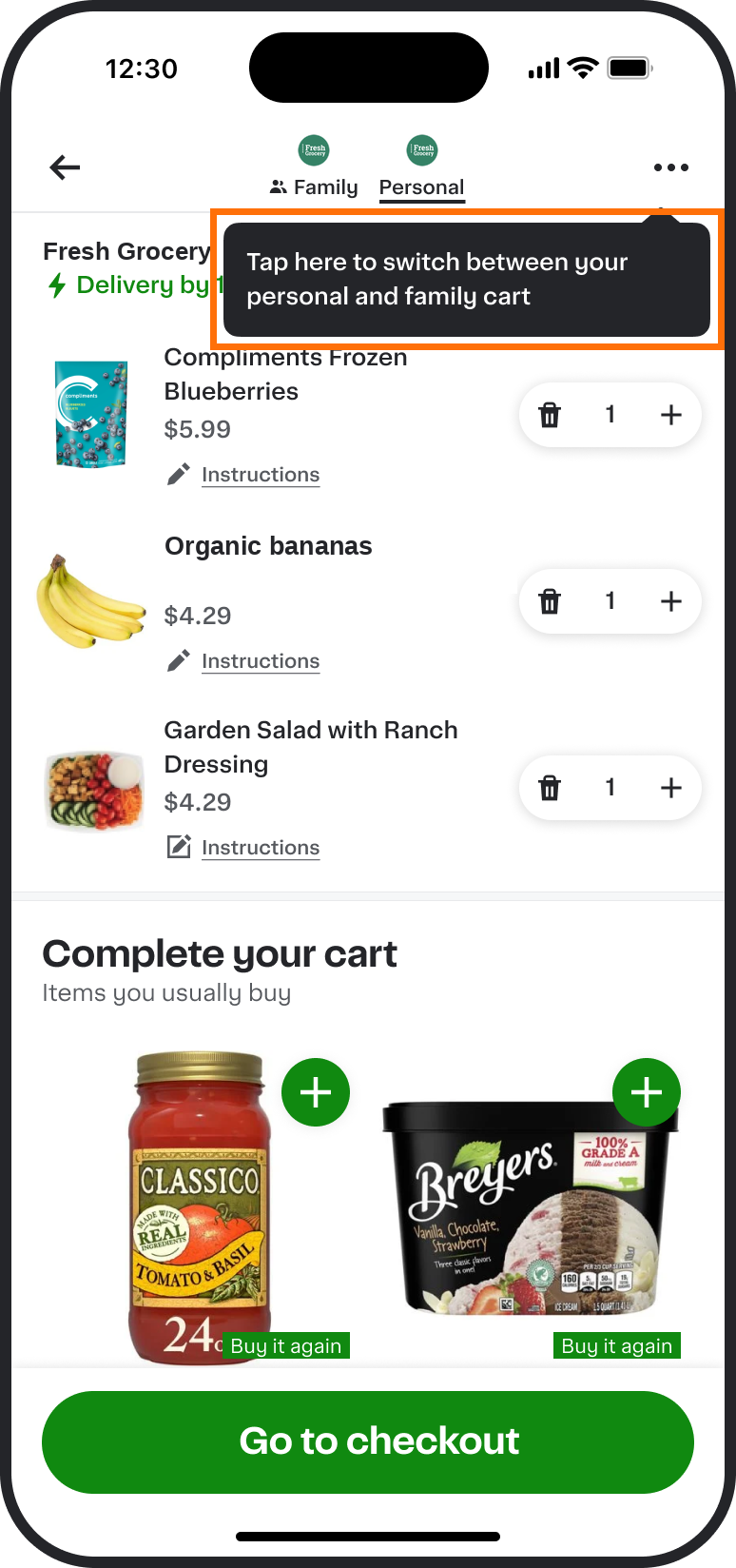
Customers in a complete family household (two or more members) now see a one-time prompt that helps them switch between their family and personal carts. The prompt appears on the storefront and in the cart, and does not reappear after it has been seen.
The following image shows an example of the cart switching prompt:
For more information, see Family accounts.
Anchor links on content pages (Storefront Pro 5)
You can now assign an anchor ID to any creative in a static or dynamic slot on a content page in Instacart Platform Portal. Anchor IDs let you create a direct link to a specific section of your page, so customers arrive scrolled to the creative you want them to see.
To set an anchor link, add a creative to a static or dynamic slot on a content page and enter an anchor ID. After setting the ID, you can copy the full URL with the anchor included to your clipboard. Share the link in your customer emails, CRM campaigns, or other external entry points.
When configuring a banner, image tile, or quick link creative destination, you can also select an anchor on the destination page. This sends customers directly to the creative you choose when they click the creative.
For more information, see Link customers to a specific section on a content page.
Customer management enhancements in Instacart Platform Portal (Storefront Pro 5)
Retailer support agents now have greater visibility into customer accounts in Instacart Platform Portal. The following enhancements are available in the Customer search tool:
- Customer name search. Agents can now search for customers by first and last name, using a full or partial name. Previously, customer search required an email address, phone number, order ID, loyalty card number, or provider UID.
- Instacart+ membership status. Customer profiles now show whether a customer's Instacart+ membership is active or expired. Previously, agents could not see whether a membership had expired.
- Account status. Customer search results now indicate when a customer's account is deactivated, helping agents and your business development team quickly determine whether an account issue is preventing a customer from placing orders.
- Promotions and credits. Agents can now view a customer's active credits available for a future order directly from the customer profile. Previously, agents had to contact Instacart's customer experience team to look up credit balances.
- Gift cards. Agents can now view a customer's Instacart and retailer gift card balances and redemption details from the customer profile.
- Order history. Agents can now view a customer's past orders, including order ID, retailer order ID, order reference, created date, fulfillment window, fulfillment type, and status. Order history can be downloaded as a CSV file.
To view customer credits, you must have access to the Customer search tool and the View customer appeasements access control enabled in Instacart Platform Portal and contact your Instacart representative.
For more information, see Find a customer.
Preview navigation changes before publishing (Storefront Pro 5)
You can now preview your navigation changes on your Storefront Pro site before publishing them. When editing a navigation link in Instacart Platform Portal, a preview opens your storefront in a new browser tab so you can review exactly how the navigation will look after you publish. Preview is available for desktop and mobile web navigation when adding or editing links. Mobile web previews require enabling mobile mode in your browser developer tools to see the navigation rendered at a mobile size.
For more information, see Manage desktop navigation and Manage mobile web navigation.
Resizable columns in Instacart Platform Portal list views
You can now resize column widths in list views in Instacart Platform Portal by dragging column edges. This makes it easier to see long item values (such as campaign, collection, and creative names) at a glance, without clicking into individual records. Column resizing is available in the Collections, Campaigns, Creatives, and Orders tools on desktop.
Mobile view for Operational dashboard in Instacart Platform Portal
The Operational dashboard in Instacart Platform Portal now displays a card layout on mobile devices. Each card represents one order and shows all the information from the list view. The layout switches automatically between a table list view or a card list view based on your device's screen size.
Previously, the Operational dashboard tool only displayed a table layout that required horizontal scrolling on smaller screens, making it difficult to review and manage orders from a phone or tablet.
For more information, see Operational dashboard.
Simplified suggested searches (Storefront Pro 5)
The rotating list of search suggestions that previously appeared in the search bar has been removed. The search bar now displays a static placeholder with your store name, for example, "Search Fresh Grocery". This update improves accessibility for customers using assistive technologies. Search functionality is not affected.
For more information, see Search bar.
Checkout notification when the customer's location is not the same as the delivery address
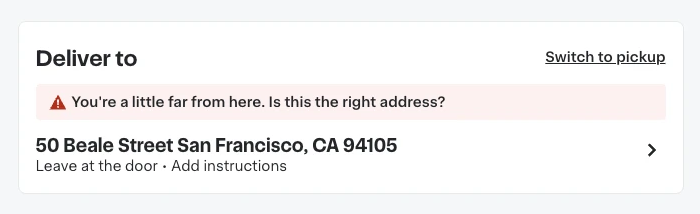
The notification that prompts customers to confirm their delivery address when their current location is more than 1 mile away is now available on web and mobile web. The notification displays a banner at checkout when a potential delivery address mismatch is detected.
The following image shows an example checkout notification:
Previously, this capability was available only on Storefront mobile apps.
For more information about the checkout flow, see Checkout.
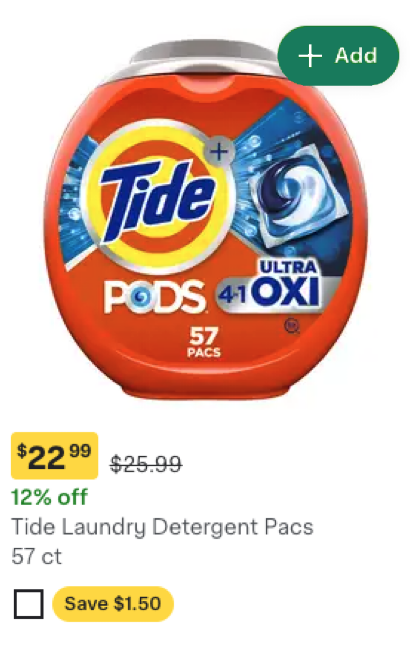
Updated item tile design
Item tiles on your storefront have been updated with the following visual changes:
- Secondary product details, such as brand, weight, and ratings, appear in a lighter color to direct customers' focus to the price and promotion.
- The coupon promotion is updated from a text label to a pill shape with refreshed colors.
- The See eligible items button is updated to a yellow that matches the promotion color. The functionality of both components is unchanged.
The following image shows a coupon promotion on an updated item tile: