2026_02_0 Release Notes
Release date: February 24, 2026
The release notes describe changes to Storefront for this release, including new features and enhancements. In addition to these changes, Instacart continually updates the platform to improve accessibility, performance, and stability and to ensure the best user experience for your customers.
New features
The following new features are available in this release.
Scheduling now available for content pages (Storefront Pro 5)
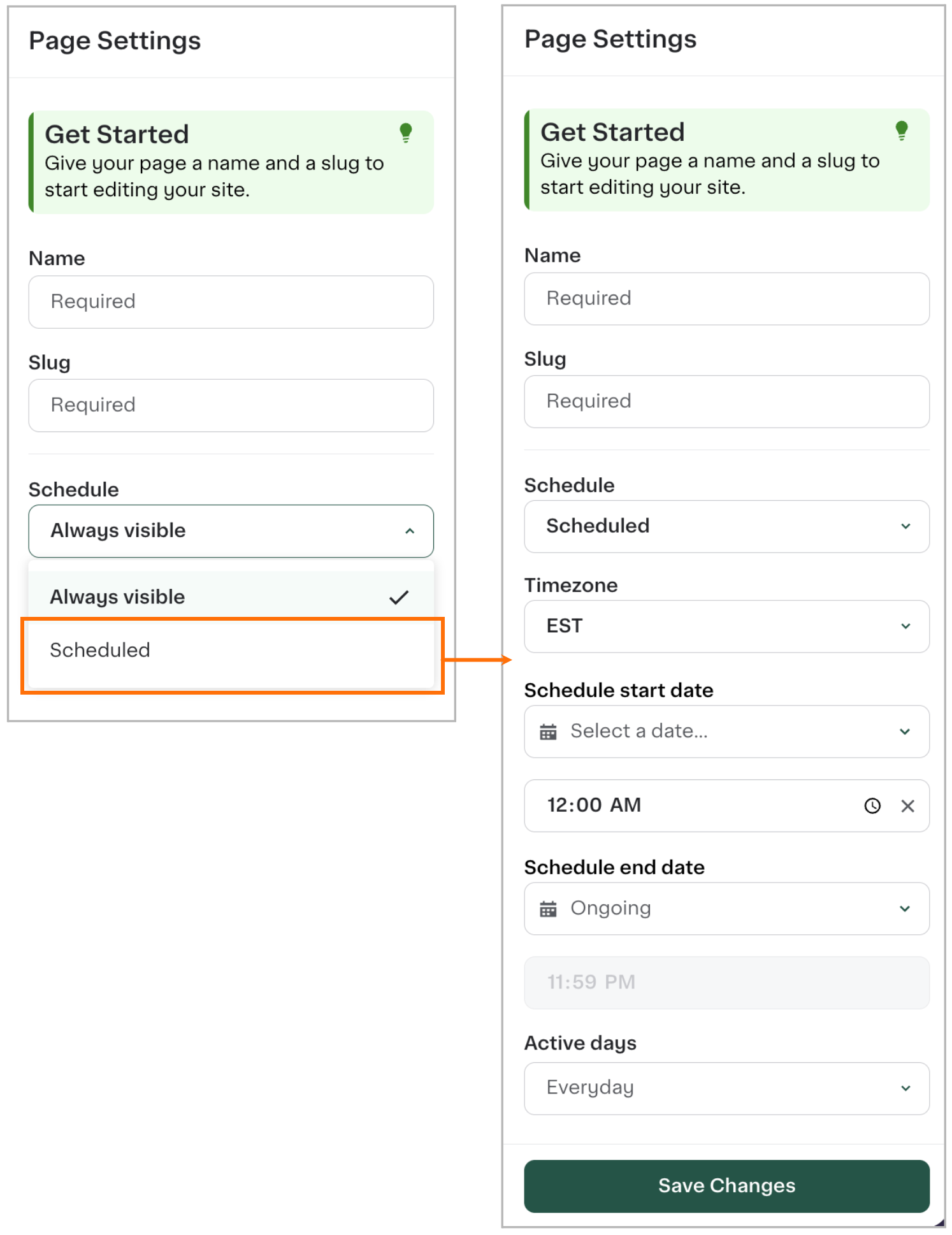
You can now schedule content pages to automatically publish and unpublish at specific dates and times in Instacart Platform Portal. You can set up one-time schedules (such as flash sales or holiday promotions) or recurring schedules (such as weekly deals or ongoing campaigns).
Scheduled content pages display one of the following new statuses:
- Active
- Scheduled
- Expired
The following images show the content page scheduling options:
For more information, see Manage content pages.
Instacart+ first year membership discounts
Customers can now receive a special offer for their first year of Instacart+ membership after they place one order. The membership discount offer can be $19, $49, or $79 for the first year, and then $99 per year after the first year. The membership discount is displayed on the Instacart+ account page, cart, and checkout toggle. This feature provides Storefront and Storefront Pro sites with the same discount benefits available on Instacart Marketplace.
To enable this feature, contact your Instacart representative.
For more information about Instacart+, see Instacart+.
Support for Ibotta coupons (Storefront Pro 5)
Instacart now supports Ibotta‑funded coupons on Storefront Pro. This lets your customers view, clip, and redeem Ibotta offers directly in their cart and at checkout.
For information about integrating with Ibotta coupons, contact your Instacart representative.
PassKit integration support for Add to Wallet (Storefront Pro 5)
Customers can now add their loyalty card barcodes directly to their mobile wallets with the new PassKit integration. An Add to Wallet button appears below the loyalty barcode, letting customers save their loyalty card to Apple Wallet (iOS) or Google Wallet (Android) with a single tap.
This feature is available to all retailers who have a PassKit account and have completed the PassKit integration setup. To enable this feature, contact your Instacart representative.
For more inforation, see Passkit integration.
Recipes tool in Instacart Platform Portal (Storefront Pro 5)
You can now upload and manage recipe files in Instacart Platform Portal. This self‑serve tool allows you to upload, edit, and publish recipes instantly without secure file transfer protocol (SFTP) uploads. SFTP upload for recipes remains available, but is now deprecated. Existing recipe files are visible in the Recipes tool and can be edited in Instacart Platform Portal.
For more information, see Manage recipes.
Floating cart
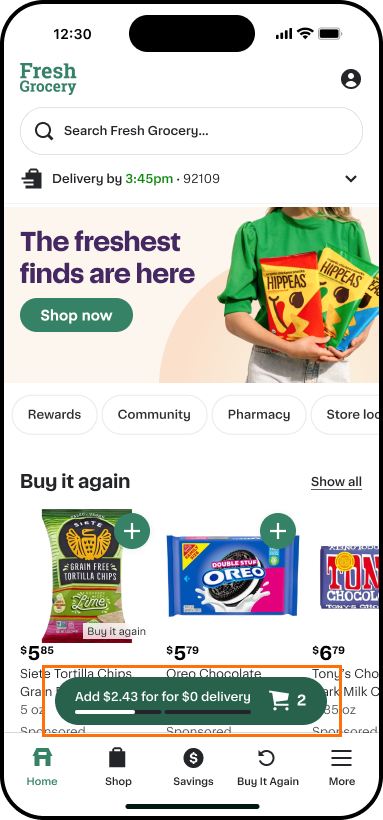
Customers now see a floating cart that tracks their progress toward available incentives, such as free delivery and basket discounts. The floating cart displays up to three offers, showing one offer at a time with a progress bar indicating additional available offers. As customers add items to their cart, the floating cart updates with the current item count and displays relevant savings information. The floating cart automatically reflects your retailer branding, including colors and themes.
This feature is available on mobile web, iOS native app, and Android native app. The floating cart displays auto-redeemed offers only and appears across all pages on your storefront, including the homepage, browse and aisle pages, and collection pages.
The following image shows an example of the floating cart displaying two offers on a mobile app:
This feature is enabled by default for all Storefront and Storefront Pro retailers. To turn off this feature, contact your Instacart representative.
For more information, see Cart.
Loyalty program tool in Instacart Platform Portal (Storefront Pro 5)
You can now set up how your loyalty program page will be displayed on your storefront using Instacart Platform Portal. This replaces the onboarding form previously provided by your Instacart representative.
For more information, see Loyalty programs.
Missing codes tool in Instacart Platform Portal
You can now review a list of codes for products that were frequently scanned by shoppers but are missing from your catalog. Each missing code includes shopper-provided images to help you identify products. You can either approve codes to add them to your catalog, or reject codes to remove them from the review list.
For more information, see Manage missing codes.
Enhancements
The following enhancements are available in this release.
Improved filter loading for Instacart Platform Portal Analytics dashboards
Improved the performance and experience when using filters in Analytics dashboards. Filter options now load faster and appear in dropdown menus directly on the page, replacing the previous modal interface. These visual enhancements improve dashboard loading times without changing any workflows or data capabilities.
For more information, see Analytics dashboards.
Improved stock level visibility controls (Storefront Pro 5)
You can now choose to hide only out-of-stock items or to hide both low stock and out-of-stock items from your Storefront Pro site. This setting applies consistently across all shopping surfaces including search, browse, and product pages, ensuring a uniform experience for customers. By default, all items in your catalog appear on your Storefront Pro site regardless of their stock level.
To configure this setting, contact your Instacart representative.
This setting does not hide products from your storefront on Instacart Marketplace.
For more information about stock level predictions, see Stock levels.
Pin products in dynamic collections
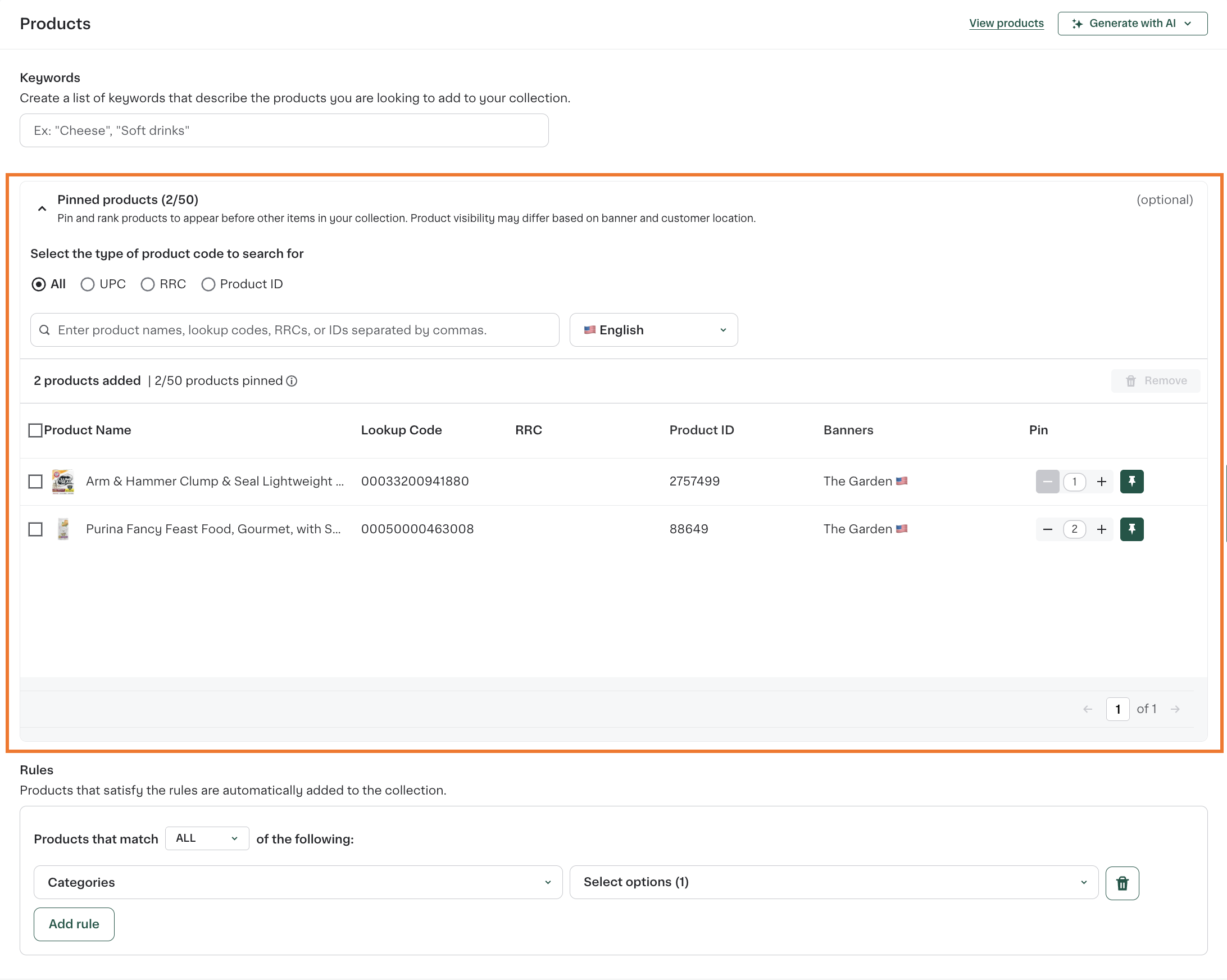
You can now pin up to 50 products at the top of dynamic collections. Pinned products always appear first in the collection and are ordered based on the assigned ranking, followed by products that match your dynamic rules. Previously, this capability was available only for static collections.
The following image shows pinned products in a dynamic collection in Instacart Platform Portal:
For more information, see Dynamic collections.
Unified Buy it again experience for multi-banner retailers (Storefront Pro 5)
Customers can now see their complete purchase history across all locations within the same banner in Buy it again. When enabled, customers see items they've purchased from any location, including both online orders and in-store transactions, regardless of which specific store they originally shopped at.
This feature creates a seamless shopping experience while keeping purchase data isolated within your organization.
To enable this feature, contact your Instacart representative.
This enhancement is already enabled for simple retailer structures. For more information, see Retailer structures.
For more information about Buy it again, see Buy it again.
Improved search results
The following search enhancements improve transparency and help customers find products more easily:
-
Improved visibility for previously purchased out-of-stock items. Previously purchased items now appear in search results even when out of stock, confirming the search was recognized while prioritizing in-stock alternatives.
-
More transparent out-of-stock item display. Search results now show relevant items marked as unavailable in inventory, making it easier for customers to understand product availability. These items only appear when they're highly relevant to the customer's search. To enable this feature, contact your Instacart representative.
-
Improved search results for new customers. Search prioritizes products that convert better for first-time shoppers, helping them find affordable options.