2026_05_0 Release Notes
Release date: May 26, 2026
The release notes describe changes to Instacart Storefront for this release, including new features and enhancements. In addition to these changes, Instacart continually updates the platform to improve accessibility, performance, and stability and to ensure the best user experience for your customers.
Are you using the partner-pick model? Review the Shopper App release notes for recent updates.
New features
The following new features are available in this release.
Redesigned Instacart Platform Portal navigation
We're refreshing the Instacart Platform Portal navigation to make it easier to find the tools you need. Based on your feedback, the navigation has been redesigned with the following improvements:
- A cleaner, single left menu. The current top and left navigation is replaced with a single, collapsible left sidebar menu. This update reduces visual clutter and makes it easier to stay oriented as you move between tools.
- Merchandising & Marketing tools organized by Instacart solution. Merchandising and Marketing tools are now grouped by Instacart solution — Marketplace, Storefront, and Storefront Pro — so it's clear which tools apply to each solution, and you can get to the right place without guesswork.
- Dedicated settings menu. Settings are now in their own dedicated menu so that the main navigation stays focused on the tools you use most.
At this time you can try the new navigation, with the option to switch back to the classic navigation as you get oriented.
Click through the following video to learn more about the new navigation:
For more information, see the announcement in the Instacart Platform Portal documentation.
Drop-off location for unattended deliveries
Customers can now see the exact location where their unattended order was dropped off. A map thumbnail appears on the order status page, pinned to the shopper's GPS location at the time the delivery photo was taken. Customers can tap the map to expand it and zoom in or out.
The map is displayed for unattended deliveries when the GPS accuracy of the shopper's device is 15 meters or better at the time the delivery photo is taken.
When a customer reports a wrong or missing order, the drop-off location map and delivery photo appear directly in the reporting flow. If the report is within 20 minutes of when the order was delivered, customers are prompted to contact their shopper via chat before being routed to Instacart Customer Experience.
For more information, see After fulfillment.
View multiple offers per item
Multiple offer types, including retailer-funded, CPG-funded, and Instacart-funded promotions, can now apply simultaneously to a single item, giving customers maximum visibility into all available savings. When an item has multiple offers, item tiles display a See all N offers button, which customers click to display a new offer sheet that lists every available promotion for that item, along with a progress indicator and a grid of eligible items for each offer.
Product detail pages now include a dedicated offers section where customers can view progress toward each promotion and navigate into its eligible items list.
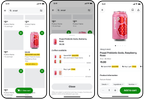
This feature is available on mobile web, iOS, Android, and desktop. To enable multiple offers per item, contact your Instacart representative.
For more information, see Multiple offers per item.
Direct link campaigns
You can now create direct link campaigns in Instacart Platform Portal. Direct link campaigns let customers redeem an offer by clicking a link or scanning a QR code. No promo code is required. You distribute the link through any channel, such as email, paid social ads, or in-store printed materials with a QR code.
When a customer clicks the link, they're prompted to sign in. Eligible customers see a confirmation, and the offer is added to their coupon wallet. Customers who don't meet the campaign's targeting requirements see a message that the offer isn't available for them.
For more information, see Click-to-redeem offers.
Budget capping for offer discount campaigns
You can now set a lifetime budget on offer discount campaigns to automatically pause them when spending reaches your target. When a campaign reaches 95% of its budget, the campaign status changes to Serving Paused — customers no longer see new offers, but any offers already added to their coupon wallet can still be applied at checkout. When a campaign reaches 100% of its budget, the campaign status changes to Budget Paused and all campaign activity stops. If you increase the lifetime budget, the campaign automatically resumes.
Budget capping is available for offer discount campaigns using click-to-redeem, auto-redeem, or direct link redemption methods. Budget capping is automatically enabled when you set a budget.
For more information, see Create offer discount campaigns.
Enhancements
The following enhancements are available in this release.
Account type targeting and reporting for drive awareness and offer campaigns
Drive awareness and offer campaigns now support targeting by account type. Campaign audiences can include rules to target customers based on whether they have a personal or business account, whether they have accounts of both types linked, or whether they show signals of being a potential business customer.
Account type is also available as a reporting dimension in Custom Reports. The Completed orders, Basket, and Search datasets now include an account type filter to analyze performance by customer account type. Completed orders also includes a split-by account type option.
For more information, see Campaigns and offers, Performance dashboards, and Datasets and templates.
Instacart Platform Portal performance improvements
Instacart has delivered several performance improvements to Instacart Platform Portal, addressing the platform stability and speed issues that retailers most commonly reported. The following improvements have been made:
- Higher availability. Instacart Platform Portal backend availability has significantly improved, so your teams can rely on the portal being accessible when they need it.
- Faster page loads. Page load times have been substantially reduced, so you can navigate the portal and complete tasks more quickly.
- Fewer session errors. The rate of user sessions encountering errors has dropped significantly, resulting in a smoother experience across order management, catalog management, authentication, and onboarding.
Group-based order guide sharing and export filtering for business accounts
Order guide sharing for business accounts now supports groups, in addition to individual team members. When an order guide is shared with a group, all current and future members of that group have access. When a member joins or leaves a group, their order guide access updates automatically.
When exporting order history, administrators can now filter the export by group to analyze spending for a specific group.
For more information, see Business accounts.
Improved reorder experience
The add all items from a previous order experience has been updated to improve performance and reliability for customers.