2025_11_0 Release Notes
Release date: November 18, 2025
The release notes describe changes to Instacart Storefront for this release, including new features and enhancements. In addition to these changes, Instacart continually updates the platform to improve accessibility, performance, and stability and to ensure the best user experience for your customers.
New features
The following new features are available in this release.
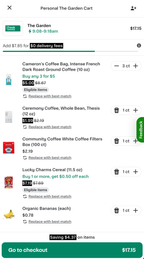
Cart offer progress tracker
Customers now see a cart offer progress tracker when they add items to their cart. This tracker shows the progress of cart-level offers, such as free delivery and cart discounts and encourages customers to complete offers before checking out.
The following image shows an example of the cart tracker displaying progress toward a $10 off cart offer:
For more information, see Cart.
AI-generated carousels added to search results
When a customer searches for an item, AI-generated carousels are displayed with the search results. The number of carousels returned varies. These additional carousels can improve user engagement and drive additional purchases.
The generated carousels include the following types:
- Substitutions: Contains items similar to the requested item. For example, a search for crab might return an Other seafood carousel with lobster and other seafood items.
- Complementary items: Contains items that go with the requested item. For example, a search for crab might return carousels named Seasonings and Side dishes.
- Themes. Contains items for a holiday, event, or special occasion related to the requested item. For example, a search for crab might return carousels named Crab cakes, Seafood feast, and New Year's Day ideas.
For more information about search, see Search results. Most retailers have this feature enabled by default. To turn off this feature, contact your Instacart representative.
Enhancements
The following enhancements are available in this release.
Cart and checkout improvements
The following cart and checkout improvements are available in this release:
- Items in the cart are displayed in the chronological order that they were added.
- The Remove Item button has been removed from items with a count greater than one. Customers can click the plus (+) or minus (-) buttons to adjust the item counts in their carts.
- Item-level promotions and grouped offers are clearly displayed.
- A total savings banner is displayed at the bottom of the cart.
For more information, see Cart.
Electronic receipts show details on offers applied to orders
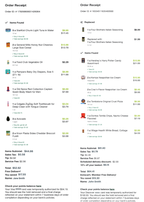
Receipts now provide a clear breakdown of discounts and offers for each item, showing the offer applied and the savings for that item. This helps customers easily confirm the offers were applied and see their total savings.
The following image shows two receipts. The first receipt has discount details on item-level offers, and the second receipt has discount details on basket-level offers.
For more information, see Receipts.
Enhancements to order rating flow
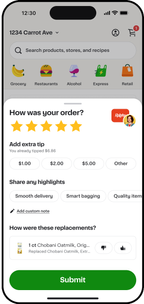
Customers can now follow an enhanced flow when rating their delivery. They can add a star rating, optionally add or increase a tip, and provide replacement feedback on a single screen.
The following image shows an example of the new order rating experience:
For more information, see Order rating flow.
Improved item matching and search result ranking
The search enhancements improve item matching and ensure that the items at the top of the search results are relevant to the customer.
The improvements include:
- Improved exact text matching for very long queries.
- Increased the relevancy of the top search results to the search query.
- Increased the diversity in search results in the top search results.
Improved search results for brand and attribute queries
When a customer's search query includes a brand name, dietary attribute, or product attribute, the search prioritizes these attributes when matching items and classifying the results. Items that match the brand or attribute (that is, the items that are more relevant) now appear higher in the primary search results. Items that don't match the brand or attribute might appear lower in the primary search results, appear in a related items section, or be omitted from the results.
Previously, the search result for these queries returned matching items but could place them in a non-intuitive position or section of the search results.
Post-checkout order status and item summary improvements
The following visual improvements have been made to the post-checkout experience:
-
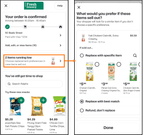
The post-checkout order status page now displays any items that are running low. This visual enhancement encourages customers to choose their replacement preferences.
The following image shows the order status page and what happens when a customer clicks the low stock prompt:
-
The item summary page now prioritizes low-stock items by displaying them at the top of the page. Customers can choose replacement preferences from here and add notes for shoppers.
The following image shows how to access the item summary page, how to edit replacement preferences, and where to add notes for shoppers:
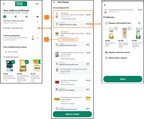
- Low-stock items appear at the top of the summary list and display an option to edit replacement preferences.
- The Add note for shopper button where customers can leave detailed notes about particular items.
For more information, see Replacements.
Improved user experience when requesting customer's address
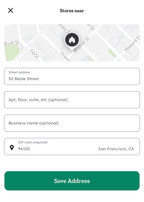
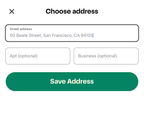
The page used to collect a customer's address on desktop and mobile web platforms has been updated to reduce unnecessary interface elements, making it more user friendly.
The following image shows the modal before and after these changes:
The following table illustrates the changes:
| Before | After |
|---|---|
 |  |
Refined delivery areas for better retailer coverage
Delivery areas are now more precise. Retailer coverage is assessed at a smaller granularity than ZIP code or postal code.
Return to storefront navigation on mobile apps search page
When customers click the back arrow from search results pages on mobile apps, they're now taken back to the storefront home page. This user experience improvement reduces the need to click back multiple times if multiple searches were performed in succession.
Removed suggested tipping standards for select regions
Various tipping standards have been removed for select retailers based on regional laws. These changes ensure that select retailers are compliant with applicable laws. Customers can still apply a delivery tip to their order by progressing through the checkout process.
For more information, contact your Instacart representative.