2025_10_0 Release Notes
Release date: October 28, 2025
The release notes describe changes to Instacart Storefront for this release, including new features and enhancements. In addition to these changes, Instacart continually updates the platform to improve accessibility, performance, and stability and to ensure the best user experience for your customers.
New features
The following new features are available in this release.
Support for new offer types
Instacart now supports the following new offer types in Storefront and Storefront Pro:
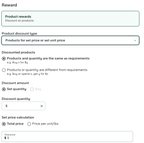
- Per unit pricing (set price per item or per lb)
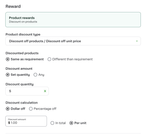
- Per item discount (set dollar off each item)
For example, you can create the following offers:
- Buy 3 cookies at $1 each
- Buy 2 lb of apples for $2 per lb
- Buy 2 apple pies and get $0.50 off per pie
These offers are applicable when you set Minimum quantity requirements only.
For more information, see Storefront offer types and Create offer discount campaigns.
The following image shows an example of a product reward with dollar off per item:
The following image shows an example of a product reward with a special price per item:
Category growth carousels on checkout aisles
New category growth carousels are added to checkout aisles. Customers now see the following categories during their checkout flow:
- Stock up on home essentials
- Get well sooner
- Best sellers in laundry
- Daily essentials
For more information, see Checkout aisle recommendations.
Checkout aisle pairings
Recommended product pairings are added to the checkout aisles. The product pairings service leverages machine learning to identify complementary products that pair well with the user's cart contents, and uses Generative AI to merchandise these complements into compelling suggestions. This feature encourages exploration and adds value through tailored suggestions that are aligned with customer preferences.
To enable this feature, contact your Instacart representative.
For more information, see Product pairings.
Add custom fields to business orders at checkout
Business administrators can define up to ten custom fields that collect information from their team members at checkout. When configuring the custom fields, administrators can set the fields as text input or defined lists.
When team members are checking out, they can input values for the custom fields from the Business order details section.
For more information, see Business accounts.
Enhancements
The following enhancements are available in this release.
Checkout notification when the customer's location isn't the same as the delivery address
To help reduce failed deliveries and associated costs from wrong-address orders, we now check the distance from the customer's current location and their selected delivery address at checkout. If their current location is more than 1 mile from where they want their order delivered, a notification prompts the customer to confirm their delivery address.
For more information about the checkout flow, see Checkout.
RRC dimension in custom reports
When creating custom reports using the basket dataset in Instacart Platform Portal, you can now include Retailer Reference Codes (RRCs) as a dimension, to compare basket performance of specific products.
For more information, see Basket.
Updated the search platform
Updated search to use the same platform that powers search on Marketplace. The new platform has been proven to decrease the latency of customer searches on mobile and web apps. This update also lays the foundation for additional search improvements in upcoming releases.
Added a Business Settings page to business accounts
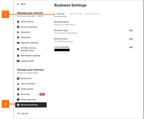
To collect infrequently used settings in one place, we added a Business Settings page and menu item. The new menu item is located under the Manage your business group.
The page contains the following tabs:
- General. Contains the following top-level business details: name, type of business, size of business, and tax ID.
- Custom fields. Contains any custom fields for business accounts. Custom fields were added in this release. For more information, see Custom fields.
- Tax Exemptions. Moved the tax exemption forms here and removed the Tax exemptions menu item.
The following image shows the new Business setting page with the General tab selected and the location of the Business settings menu item:
For more information about business accounts, see Business settings.