2025_03_0 Release Notes
Release date: March 25, 2025
The release notes describe changes to Instacart Storefront for this release, including new features and enhancements. In addition to these changes, Instacart continually updates the platform to improve accessibility, performance, and stability and to ensure the best user experience for your customers.
New features
The following new features are available in this release.
Jump to page in Instacart Platform Portal
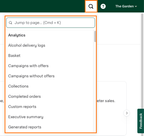
You can now search for and navigate to any tool or report in Instacart Platform Portal. You can use the Jump to page function by clicking the search button in the top toolbar, or using either the Ctrl+K or Cmd+K keyboard shortcut. The Jump to page function provides quick access to the tools and reports that you use within Instacart Platform Portal.
The following image shows the Jump to page function in Instacart Platform Portal:
For more information, see Instacart Platform Portal overview.
Enterprise Technical Support in Instacart Platform Portal
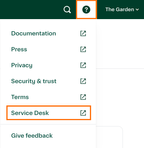
You can now access Instacart Enterprise Technical Support directly from Instacart Platform Portal. The Enterprise Technical Support team handles technical concerns, tasks, questions, and feedback for Instacart Enterprise offerings. You can contact the team by clicking the Service Desk button in Instacart Platform Portal.
The following image shows the Service Desk button:
For more information, see Instacart Enterprise Technical Support.
Free service offers
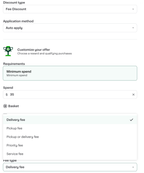
When you create an offer in Instacart Platform Portal, you can allow customers to receive free service, such as delivery, pick up, priority fees, and service fees, or a discount on these fees. You can use this feature to create incentives for your customers, such as No delivery fee during the Superbowl weekend, Free priority fee on your next order, and Free service fee when you spend $35.
If a customer uses a coupon, the service is free. If the discount is applied automatically, they can either receive a free service or a discount on it.
The following image shows the offer setup in Instacart Platform Portal:
For more information, see Define the offer.
Include alcohol items in offer conditions
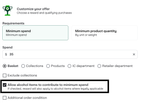
You can allow customers to purchase alcohol to count towards minimum spend condition requirements. This is useful when you want to create an offer that targets non-alcohol sales due to marketing or regulatory reasons. By selecting this checkbox, any alcohol item added to the customer's cart will count toward the offer's spend condition.
The following image shows the Allow alcohol items checkbox in Instacart Platform Portal:
For more information, see Define the offer.
Offers for weighted items
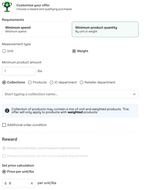
You can create incentives to drive growth of your weighted items. Using Instacart Platform Portal, you can now create weighted item offers, such as Get beef for $4/lb when you buy 2lbs or more. To do so, select Minimum product quantity as your offer's requirement, then select Weight. From the Reward section, set the price per unit/lbs for this offer.
The following image shows the offer requirements and reward setup for weighted items:
For more information, see Define the offer.
Additional offer conditions
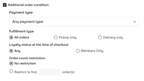
You can now add the following conditions for offer redemption in Instacart Platform Portal:
- Payment type. Set the condition for the offer based on the order payment type. This applies to Basket orders and Fee Discount types only.
- Fulfillment type. Delivery or pickup or both. This applies to Basket offer discount types only.
- Loyalty status at the time of checkout. This applies to Basket offers and Fee Discount types only.
- Order count restriction. Limit the offer to the first X number of orders. This applies to all Discount types.
While these conditions are optional, applying advanced offer conditions allows more flexibility in creating promotions that encourage specific user behaviors. For example, you can apply the Members Only condition to create exclusive deals for loyalty program members, thereby increasing the value and appeal of your loyalty program.
The following image shows the additional offer condition options in Instacart Platform Portal:
For more information, see Define the offer.
Item offer cart progress tracker
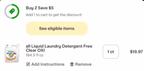
The cart features a progress tracker for item-level offers. This visual indicator shows customers how many items they need and highlights how close they are to qualifying for the offer. This can encourage them to add more items to their cart to satisfy the offer.
The following image shows the Item offer cart progress tracker in a customer's cart:
For more information, see Cart.
Enhancements
The following enhancements are available in this release.
User experience improvements for family accounts
Customers can now invite others to their family accounts directly from the storefront page or their shopping cart. They can also manage their family accounts from these locations. These new entry points make it easier for customers to discover and manage family accounts and carts.
Additional user interface enhancements include:
- Viewing invite status
- Accepting and declining invitations
- Collaborating on family carts
- Viewing family order confirmation
- Viewing family order history
For more information, see Family accounts.
Simplified Instacart+ membership cancellation experience
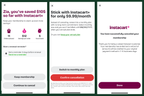
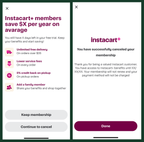
Customers can now cancel their Instacart+ memberships with fewer clicks. When canceling a paid membership, customers are shown how much savings they've earned as a member. If they haven't placed an order as a member, they're shown an average of potential savings benefits. They can also switch their membership plan between monthly and annual.
The following images show the paid membership cancellation experience:
If a customer is canceling a trial membership, they're reminded of the membership benefits and how many days they have left in their trial.
The following images show the trial membership cancellation experience:
For more information, see Instacart+.
Dedicated retailer profiles for SMS communication
Retailers can now customize SMS communication with customers by using dedicated profiles. These profiles allow retailers to display their name and phone number in SMS messages to their customers for a more personalized experience. This allows customers to know who is sending them SMS messages.
Contact your Instacart+ representative for help with your dedicated profile.
Improved bot protection
Using the AWS Bot Control SDK, new bot protection measures have been added to detect and mitigate malicious bot traffic on your storefront site. Key benefits include improved storefront performance, pricing protection, and real-time detection through features such as security tokens and bot detection signals.
Executive summary filter improvements
In Instacart Platform Portal, added the following filters to the Executive summary dashboard:
- Store
- Store state
- Store region
- Order fulfillment type (Pickup, Delivery)
- Order source (Instacart App, Storefront Pro)
- Order platform (Web, Mobile Web, iOS, Android)