2025_01_0 Release Notes
Release date: January 28, 2025
The release notes describe changes to Instacart Storefront for this release, including new features and enhancements. In addition to these changes, Instacart continually updates the platform to improve accessibility, performance, and stability and to ensure the best user experience for your customers.
New features
The following new features are available in this release.
Venmo payment method
Customers can now use their Venmo digital wallet as a payment method.
Customers can add Venmo as a payment method from their Account settings page, or at checkout.
The following image shows the Venmo payment method at checkout:
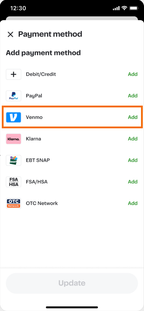
Venmo can't be used for orders that contain alcohol or medical prescriptions.
For more information, see Payment methods.
Campaigns without offers dashboard
In Instacart Platform Portal, added a new dashboard that provides insight exclusively into campaigns that don't offer customer incentives, such as discounts or rewards. Non-incentive campaigns include Drive awareness and Search page marketing.
For more information, see Campaigns without offers dashboard.
Enhancements
The following enhancements are available in this release.
Checkout screen enhancements
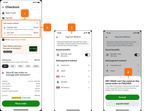
Visual enhancements have been made to improve the checkout screen, helping customers use multiple payment methods for an order.
Implemented the following enhancements to the Checkout screen:
- Moved the payments section above tips and totals.
- Displayed split payment totals inline with the selected payment methods.
- Added a prompt for back-up payment methods when necessary.
- Added messaging to explain invalid payment combinations.
- Reduced text in the legal disclaimer. Customers can view removed text by clicking Learn more.
The following image shows some of the enhancements to checkout:
For more information, see Payment methods.
Improved page metadata to support search engine optimization (SEO)
Following an audit of our Storefront sites for SEO best practices, Instacart now generates unique and semantically meaningful content for page titles, page descriptions, and in-page headings. This improves the discoverability of the homepage, collections, collection subjects, recipes, and flyers.
Previously, some of these elements contained duplicate values across pages, such as using the same page heading for a collection and for a subject within a collection.
Added item-level discount types to the Offer Discount campaign
When you create an Offer Discount campaign in Instacart Platform Portal, you can now choose from the following new item-level discount types:
- Dollar off products or collections. Enables Buy X, Get $Y Off, where the reward is applied either to the purchased products or to another product from the same or different list of items.
- Percentage off products or collections. Enables Buy X, Get Y% Off, where the reward is applied either to the purchased products or to another product from the same or different list of items.
- Set price on products. Enables Buy X for $Y offers.
- Free item. Enables Get X Free offers.
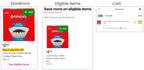
When a customer satisfies an offer condition, the discount is applied automatically to the item prices in the cart.
The following images show a Buy 2, Get 25% Off offer in an item tile, the eligible item, and the discount applied to the two items in the cart:
Previously, you had to create these discount types by defining promotions in your catalog inventory file.
For more information, see Manage offer discount campaigns.
Added the ability to define multiple audience segments for a campaign
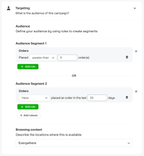
In Instacart Platform Portal, you can now define multiple audience segments within a campaign by defining multiple targeting rulesets. The audience segments are joined by the OR operator, which means customers who match the criteria of any one of the segments can qualify for the campaign.
The following image shows an example of two audience segments: customers who have placed more than five orders OR customers who have ordered in the last 28 days:
Previously, you could create one audience segment ruleset per campaign.
For more information, see Manage offer discount campaigns.
Pagination of campaigns and offers list
In Instacart Platform Portal, the list of campaigns and offers in the Campaigns and Offers tool is now organized into pages. This enhancement makes it easier to find, view, and manage campaigns. For example, when searching for a campaign, you can now look through the pages of the list by using the arrow buttons. You can also adjust the number of rows on the page.
The following image shows the pagination options in the Campaigns and Offers tool:

For more information, see Campaigns and offers.
Redesigned store labor performance dashboard
Implemented enhancements to the Store labor performance dashboard in Instacart Platform Portal, including the following:
- Updated interface. View totals and percentage changes for key metrics on a single screen.
- Improved filtering. Filter data by date range, banner, and store location.
- Streamlined trends chart. View metrics changes over a selected time period alongside data from the previous time period for comparison.
- Updated field name. The Shopper rating field has been renamed to Average order rating.
For more information, see Store labor performance.