Buy it again collection
The Buy it again collection contains a customer's previously purchased items. Making this collection highly visible helps customers easily reorder items they've previously purchased.
Buy it again on your storefront
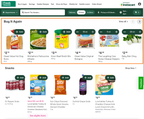
In your storefront, the Buy it again collection appears on a dedicated Buy it again page and also in product carousels on other pages. In addition, a Buy it again label appears on the item tile and product details page for each item in the collection.
For customers who have purchased six or more products, a Buy it again carousel appears on the homepage. The following image shows the Buy it again carousel on the homepage.
How buy it again collections are generated
Instacart uses the following factors to generate Buy it again collections:
- Customer's online order history
- Customer's in-store purchase history (if you send in-store transaction data through a loyalty integration)
Results are ranked based on a combination of how frequently and how recently the items were purchased.
Collection management
While the Buy it again collection is generated automatically, customers can manually update the collection.
Adding items to the collection
Whenever a customer purchases an item, that item is added to their Buy it again collection automatically. Customers should expect a variable delay between ordering a new item and that item appearing in the collection. Items in the collection are displayed with a Buy it again label on the item tile and product details page.
To change the color of the Buy it again label, use Instacart Platform Portal. For more information, see Configure brand colors.
Removing items from the collection
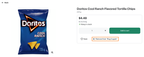
Customers can remove items from their Buy it again collection by clicking the Remove button on the product details page. The item is removed from the collection and the Buy it again label is removed from the item tile and product details page.
The following image shows the product details page with the Remove from "Buy it again" option: