Buy it again page
The Buy it again page highlights a customer's previously purchased items, which makes reordering easy, improves customer retention, and increases cart sizes.
Page contents
The Buy it again page includes the following:
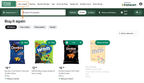
- The Buy it again collection displayed in a product grid. For more information about this collection, see Buy it again collection.
- Categories to group items, including:
- All items. Displays all previously purchased items.
- Past orders. Groups the previously purchased items by order history. This includes items bought in the last 20 orders within the last 12 months.
- Saved. Displays the customer's saved items.
The following image shows the Buy it again page on desktop browsers:
Customers with little or no order history
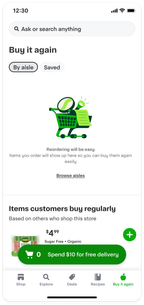
For customers who have never placed an order, the Buy it again collection is empty. For customers with 0 to 5 orders, the Buy it again page displays an empty Buy it again collection followed by the Items customers buy regularly collection. This experience helps customers with little or no order history build their cart by suggesting items other customers frequently repurchased.
The following image shows an example of an empty Buy it again page on a mobile app:
Page entry points
The Buy it again page is automatically available from the following entry points:
- Header link
- Buy it again carousel by clicking the View all button