Order status page
An order status page provides live updates to your customers while their orders are being fulfilled. The page contains the list of items, a map, the shopper's name, pickup or delivery details, and a discovery feed with product recommendations.
Customers can take the following actions on their orders:
- Add to their orders until shopping begins.
- Modify any items or add notes.
- Reschedule their order for a different date or time.
- Review the current status of the delivery or pickup orders.
- Help their shoppers with any replacement decisions.
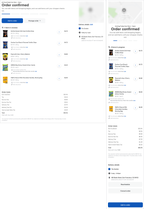
The following image shows an example of a delivery order in the Order Confirmed status on desktop and mobile browsers:
After a delivery or pickup order is confirmed and before the delivery or pickup flow starts, the order goes through the following statuses:
-
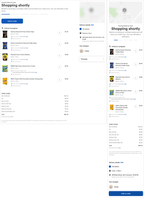
Shopping shortly. Your storefront acknowledged the order, and the order is waiting for a shopper to start picking the items.
The following image shows an order status page with the Shopping shortly status on desktop and mobile browsers:
-
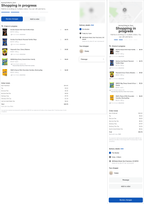
Shopping in progress. Shopper is picking the items. Shopper can mark the items as found, replaced, or refunded.
The following image shows an order status page with the Shopping in progress status on desktop and mobile browsers:
-
Shopping complete. Shopper finished picking the items and checked out.
After shopping is complete, the remaining statuses an order moves through depend on whether the order is a delivery or pickup order. For more information, see Delivery flow and Pickup flow.
Approval by text message
Available on request means that the feature is turned off by default. To turn on a feature, contact your Instacart representative.While shoppers pick orders, they send messages to customers about replacements and refunds. Customers who placed their order on the website receive their shopper's messages both on an order status page and by text message to their mobile device. You can enable your customers to approve changes by text message.
When this option is enabled, a customer can send a text message to approve the last change or all previous changes. For other options, the customer clicks the link in the text message to open an order status page and selects their response for each change.