Live order status updates on mobile devices
Customers with your Storefront mobile apps receive real-time order status updates directly on their device screens without opening the app. The notifications update automatically as the order moves through each stage, from order confirmation through shopping and delivery.
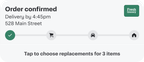
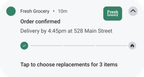
The notifications display the following information:
- A progress bar with order stage icons
- Your retailer logo
- Action buttons for customers to add items or approve replacements
The display format varies slightly by mobile platform:
- iOS. Order progress appears on the lock screen, Dynamic Island (iPhone 14 Pro+), and Apple Watch.
- Android. Dynamic notifications with a progress bar and order stage indicators appear in the notification shade.
The following table shows examples of order confirmation notifications on iOS and Android mobile devices:
| iOS | Android |
|---|---|
 |  |