Order rating and tipping
Customers are prompted to rate their delivery orders on the order status page and homepage. Customers can rate their order and any replacement items, and also update their tip to reflect the quality of their delivery experience.
Order rating flow
The following image shows the delivery order rating and tip experience for a 5-star rating:
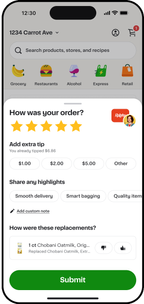
The extra tip option appears only for 5- and 4-star ratings.
Tipping
Customers can change the tip amount that they set at checkout within the following timeframes:
- Within 2 hours, customers can edit a tip.
- After 24 hours, customers can only increase a tip.
Customers can change a tip amount by opening the Order History page and viewing the order details.