Departments
The department menu displays departments and collections for your customers to browse your store. Departments are folders that help organize your collections.
Predefined departments and collections
Instacart Storefront sites include the predefined departments and predefined collections that are common in your line of business. The products that you offer for sale are automatically assigned to the appropriate collections and departments. For example, ground beef products are included in the Burgers & Ground Beef collection under the Meat & Seafood department.
Products that aren't available for the customer's current location or fulfillment method are hidden. If a department contains zero available products, the entire department is hidden. Inventory is checked approximately every two hours.
Retailer collections
In addition to the predefined collections, you can create your own retailer collections to add to the department menus.
To create the collections and add them to the department menus, use Instacart Platform Portal. For more information, see:
Navigation structure
To avoid complexity for customers, department navigation is limited to three levels. The first two levels display in the department menu and can include departments or collections. The third level displays on the page and can include collections only.
The following example shows the Meat & Seafood department:
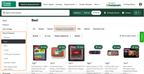
- Level 1: Meat & Seafood is a department
- Level 2: Beef is also a department (also known as an aisle or sub-department)
- Level 3: Burgers & Ground Beef is a collection.
To rearrange the order of departments and collections, use Instacart Platform Portal. For more information, see Manage departments.