Products
A product is something that you can sell. When you add products to your catalog, you want to include product details that can help your customers search and find what they want. Product details include many attributes, such as name, description, image, tags, and price. When customers browse your digital storefront, the products that are available at that store are shown in item tiles.
The following image shows two item tiles with product details:
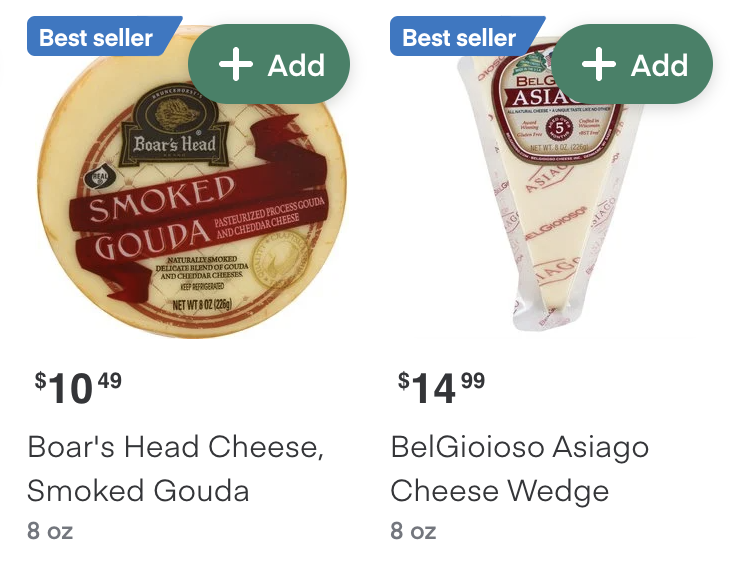
Customers can click the item tile image to open the product details page and read more information, such as ingredients or nutritional value. The product information that displays on the item tiles and product details pages are retrieved from your catalog.
Restricted products
Restricted products are items with legal requirements, such as minimum age and maximum quantity limitations. These requirements vary by region. Your catalog can contain restricted products as long as they are not on the Instacart list of prohibited products.
When a cart contains a product that requires age validation, the checkout flow requests the customer’s date of birth and includes it in the order sent to Instacart. If the date of birth is missing or the customer is not old enough to purchase the item, the customer cannot proceed to payment. Instacart Marketplace and Instacart Storefront e-commerce sites automatically include this age validation during checkout.
Restricted products currently include alcohol and over-the-counter medication, but this is subject to change.
To enable the sale of restricted products, contact your Instacart representative.
Prohibited products
Instacart reserves the right to refuse to fulfill certain types of products. If you include any of these prohibited products in your catalog, they are not displayed on your storefront for customers to purchase.
Products might be prohibited for the following reasons:
- Health or safety risk to customers or shoppers, such as weapons
- Legal restrictions, such as products containing controlled substances
- Fraud risk, such as gambling products
- Size, weight, or price (retailer-defined)
The following are examples of prohibited items that are not available for fulfillment:
- Donations
- Drugs containing controlled substances, such as pseudoephedrine (US retailers), opioids, and methamphetamine
- Dry ice
- Fireworks and sparklers
- Gift cards
- Hazardous materials and chemicals
- Helium tanks
- Knives, including:
- Pocket knives with auto-open blades
- Hunting knives
- Lottery tickets, scratch cards, and scratch-off tickets
- Microsoft Office software
- Pet animals
- Postage stamps
- Rug Doctor machine rental
- Tobacco products, including e-cigarettes and vapes
- Weapons and weapon supplies, including:
- Guns
- Ammunition
- Magazines
- Gun safes and vaults
The list of prohibited products varies by locale and is subject to change without notice. For the most up to date information about prohibited products, contact your Instacart representative.
Configuration
Send your inventory file with product details to Instacart through the designated SFTP server.
Setting up your initial product catalog
If this is your first time setting up products for your storefront, your Instacart representative will explain requirements during onboarding.
Your representative covers the following information:
- The launch phases and expected timelines for setting up your first catalog.
- The SFTP server credentials that you need to use to upload inventory files to Instacart.
- The inventory file specifications that you need to follow when defining products.
Products at different store locations
Many retailers have multiple store locations in different regions. Some products might have different details across stores, such as price, sales, promotions, and availability.
You have the following options for setting unique product details across multiple stores:
- Create an inventory file for each store and upload the files in separate SFTP subdirectories. There must be a one-to-one relationship between the number of files and the number of stores.
- Create and upload a single inventory file that contains the data for all stores. Define the store-specific product details on separate rows and use the
location_codecolumn to identify the store.
If a customer changes stores during their session, Instacart automatically updates the catalog to reflect accurate product availability and pricing for the new store.
Maintaining your product catalog
After your initial catalog is configured, you can add, update, or delete products by using any of the following options:
- Upload an updated inventory file to the SFTP server. For more information, see Catalog inventory file.
- Use Instacart Platform Portal. In the Portal, you can update one product at a time and edit some of the product details. For more information, see Manage product details.
Update your product details as frequently as your pricing and availability changes. It is recommended that you update at least once a day. Instacart continuously updates your catalog.
Add products to a collection
Merchandise your products by creating collections. For example, you can create a collection of products that are on sale and then promote the collection on your storefront. For more information, see the following topics:
- Manage collections
- (Storefront Pro 5) Rank products in collections