Automated campaigns
Automated campaigns run continuously and target customers at key stages of their shopping journey. Instacart sets up each campaign with recommended offer values and timing, so you can start reaching customers quickly.
To enable automated campaigns, contact your Instacart representative.
Automated campaigns target the following customer segments:
- Activation campaigns. Customers who created an account but have not placed an order. For more information, see Storefront wave.
- Deep churned campaigns. Customers who have not placed an order in 84 or more days.
Storefront wave
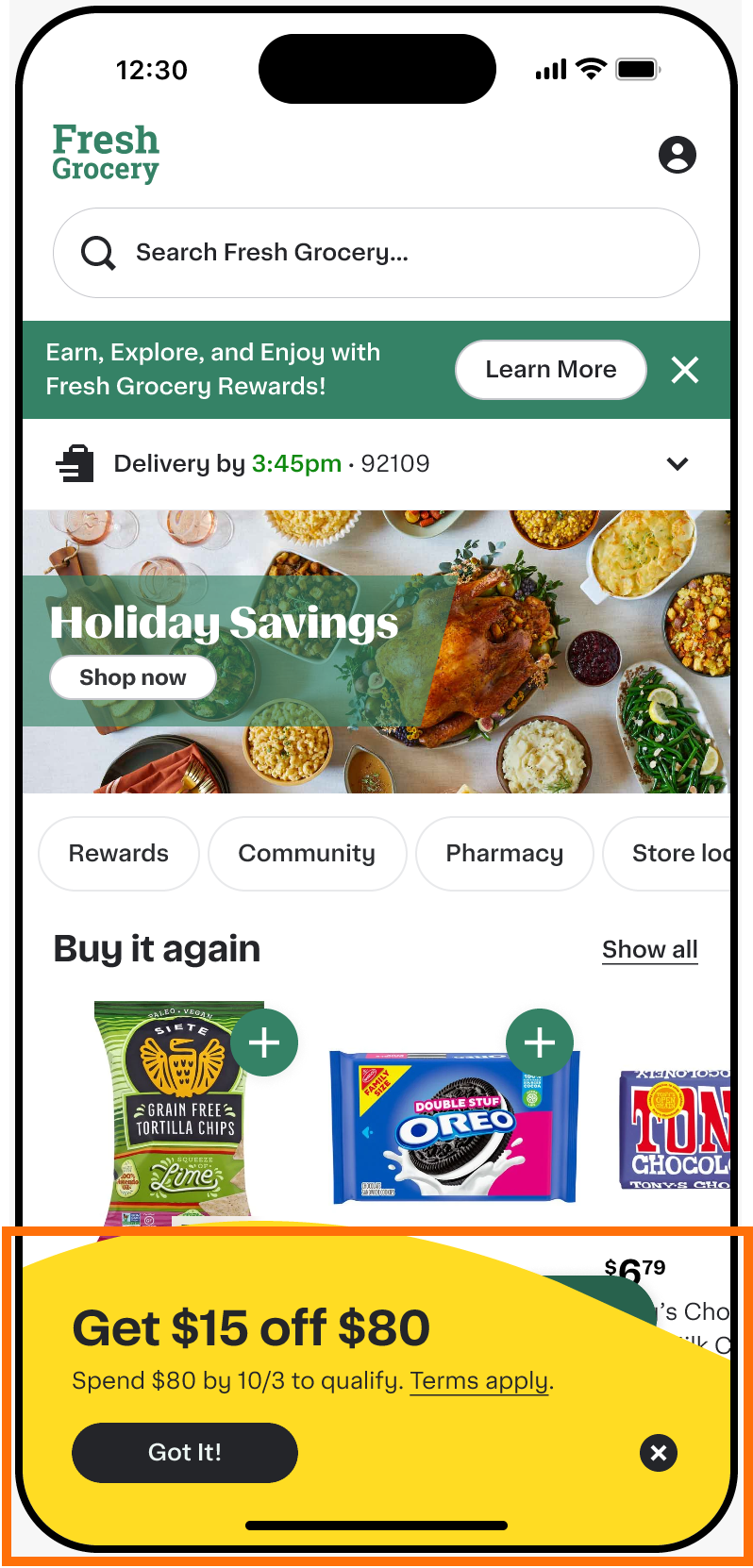
When a new customer signs up, the storefront wave appears at the bottom of the storefront and displays their sign-up offer. The wave displays a single offer at a time. Customers can dismiss the wave during their shopping session, but it reappears each time they open the app until they place their first order. The wave does not appear in in-store mode.
The following example shows the wave on a mobile storefront displaying an active discount offer:
The wave works alongside the floating cart, which tracks up to three offers, and the cart tracker to give customers a complete view of available offers and their progress toward redemption.
The wave uses your promotional branding color. For more information, see Configure brand colors.
Configuration
To configure automated campaigns, see Manage automated campaigns in the Instacart Platform Portal documentation.