
Products

A product is something that you can sell. When you add products to your catalog, you want to include product details that can help your customers search and find what they want. Product details include many attributes, such as name, description, image, tags, and price. When customers browse your digital storefront, the products that are available at that store are shown in item tiles.

The following image shows two item tiles with product details:
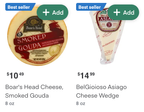
Customers can click the item tile image to open the product details page and read more information, such as ingredients or nutritional value. The product information that displays on the item tiles and product details pages is retrieved from your catalog.

Send your inventory file with product details to Instacart through the designated SFTP server.

Set up your initial product catalog​

If this is your first time setting up products for your storefront, your Instacart representative will explain requirements during onboarding.

Your representative covers the following information:

Display different products at different store locations​

Many retailers have multiple store locations in different regions. Some products might have different details across stores, such as price, sales, promotions, and availability.

You have the following options for setting unique product details across multiple stores:

  • Create an inventory file for each store and upload the files in separate SFTP subdirectories. There must be a one-to-one relationship between the number of files and the number of stores.
  • Create and upload a single inventory file that contains the data for all stores. Define the store-specific product details on separate rows and use the location_code column to identify the store.

If a customer changes stores during their session, Instacart automatically updates the catalog to reflect accurate product availability and pricing for the new store.

Maintain your product catalog​

After your initial catalog is configured, you can add, update, or delete products by using any of the following options:

  • Upload an updated inventory file to the SFTP server. For more information, see Catalog inventory file.
  • Use Instacart Platform Portal. In the Portal, you can update one product at a time and edit some of the product details. For more information, see Manage product details.

Update your product details as frequently as your pricing and availability changes. It's recommended that you update at least once a day. Instacart continuously updates your catalog.

Add products to a collection​

Merchandise your products by creating collections. For example, you can create a collection of products that are on sale and then promote the collection on your storefront. For more information, see Manage collections.