Checkout aisle page
After a customer clicks the Go to checkout button from the cart, a checkout aisle page opens. Recommended product recommendations are automatically generated. Customers can optionally add items to their cart and then click a button to continue checking out.
If you want to add custom collections to the checkout aisle page, consider upgrading to Instacart Storefront Pro.
Checkout aisle
The following image shows an example of a checkout aisle with two collections visible:
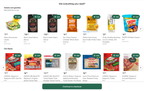
The Instacart recommendations service uses machine learning to generate these collections. Collections can include growth categories, popular items, items the customer has previously purchased but aren't in their cart, or items the customer looked at in this session but didn't add to their cart. For more information, see Recommendations.