Lifetime Value (LTV)
When a template uses start_date, both start_date and end_date are inclusive. end_date may equal today. The previous day's data becomes available overnight, so today's rows first appear after the next daily run.
The Lifetime Value (LTV) template measures how much customers spend over time for specific brands or categories within a set time period. This helps partners understand the long-term value of customers who buy their products on Instacart.
The template tracks first-time buyers during a specific window and calculates their total spending over the following 90, 180, or 360 days. Results can be grouped by brand, department, super category, or category. Each row in the results represents an aggregated group of at least 100 users.
You can perform the following actions with this template:
- Analyze customer spending starting from their first purchase.
- Select a lookback window of 90, 180, or 360 days for the analysis.
- Focus on specific brands or product categories for analysis.
- View spending data at different levels, such as brand or category.
Run the query
Use the following query to calculate the LTV:
set cleanroom_name = 'CLEANROOM_NAME';
call samooha_by_snowflake_local_db.consumer.run_analysis(
  $cleanroom_name, -- cleanroom name
  'ltv',
  [], -- Consumer tables (none needed)
  [], -- Provider tables (none needed)
  object_construct(
    'end_date', '2025-03-31',
    'lookback_window', '90 days',
    'brands', ['BRAND_NAME_1'],
    'categories', ['CATEGORY_NAME_1'],
    'aggregation_level', ['delivered_entity_brand']
  )
);
Parameters
| Parameter | Description | Data type | Allowed values | Required or optional |
|---|---|---|---|---|
end_date | Sets the end of the analysis period (inclusive). | string | Must be no earlier than 3 years ago and no later than today. Use the following format: YYYY-MM-DD. Data through the previous day is available. If end_date is today, the query runs, but today's data is empty until the next daily pipeline run. | required |
lookback_window | Defines the time period for calculating LTV. | string | "90 days", "180 days", "360 days" | required |
aggregation_level | Determines how results are grouped. | array | "delivered_entity_brand", "delivered_entity_department", "delivered_entity_super_category", "delivered_entity_category" | optional |
brands | An array of brand names to apply to a filter. | array | Brand names as they appear in the catalog | optional |
categories | An array of categories to apply to a filter. | array | Category names as they appear in the catalog | optional |
Result
| Result | Description |
|---|---|
PARAMS_JSON | A JSON object detailing all input parameters |
AGGREGATION_LEVEL | The specified dimensions for aggregation |
LTV | The average lifetime per customer, in dollars |
Example result
| PARAMS_JSON | DELIVERED_ENTITY_BRAND | LTV |
|---|---|---|
| {"end_date":"2025-02-01","lookback_window":"90 days", … } | BRAND_NAME_1 | 45.67 |
Data collection and classification
The LTV template organizes and categorizes the data using the following methods:
- Minimum user threshold. Results are only returned when the cohort contains at least 100 unique users.
- Date validation. Requires
end_dateto be no earlier than 3 years ago and no later than today (inclusive). - Aggregated results. Individual customer data is never exposed; only aggregated metrics are returned.
- Parameter validation. Invalid parameters result in empty result sets rather than errors.
- Secure processing. All calculations are performed within clean room boundaries.
Best practices
Consider the following best practices when running this query:
- Choose end dates that align with your business reporting cycles.
- Use 90 days for short-term analysis, and 360 days for comprehensive LTV measurement.
- Apply brand and category filters to focus on specific product areas.
- Select aggregation levels that match your business hierarchy and reporting needs.
Methodology
This template employs various methodologies to gather, analyze, and interpret data.
Cohort-based method
The LTV calculation uses a cohort-based methodology that measures customer value precisely.
- Cohort definition. Selects customers who purchased for the first time in a specific brand or category during a set time period.
- Spend tracking. Calculates how much each customer in the cohort spends over the lookback window.
- Average calculation. Computes the average spending across all customers in the cohort.
Calculate LTV
LTV adds up the total spending for all customers in a cohort over the lookback window., then divides by the total by the number of customers in the cohort.
The following image shows the LTV formula:
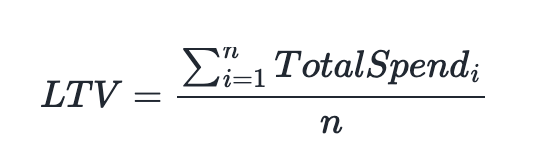
Where:
- n is the number of customers in the cohort.
- TotalSpend i is the total spend for customer i over the lookback window.
Analyze LTV results
When interpreting LTV results, consider the following factors:
- Seasonality. Results may be affected by seasonal buying trends.
- Lookback window. Longer lookback windows give a fuller picture but may include fewer recent cohorts.
- Category focus. Using brand/category filters ensures the analysis focuses on specific products.
- Customer lifecycle. New and existing customers can behave differently and affect the results.
Limitations and considerations
Keep in mind the following limitations and considerations when using this template:
- Business context. Results should be interpreted within marketing activities and business cycles.
- Data completeness. LTV accuracy depends on complete transaction history within the lookback window.
- Market dynamics. External factors may influence customer spending patterns.